YOLO (You Only Look Once) is a single-stage, real-time object detection framework that processes an entire image in one forward pass, predicting bounding boxes and class probabilities simultaneously. Unlike two-stage detectors such as R-CNN, YOLO treats detection as a unified regression problem, making it orders of magnitude faster while maintaining competitive mean Average Precision (mAP). Modern variants including YOLO11 and YOLO26 extend the paradigm to segmentation, pose estimation, and NMS-free end-to-end inference.
Why YOLO Still Dominates Real-Time Object Detection
The global AI in computer vision market was valued at USD 19.52 billion in 2024 and is projected to reach USD 63.48 billion by 2030 at a CAGR of 22.1% (MarketsandMarkets, 2024). YOLO training and deployment sits at the centre of this wave. Teams choosing the right YOLO model, dataset strategy, and export format are shipping production systems weeks faster than those who are not.
For software developers and CTOs evaluating real-time object detection, three questions matter most: How quickly can you reach a production-ready mAP? What does the deployment stack actually look like? And how do you stop accuracy degrading after you go live?
Speed without structure is just a fast failure. The teams that master YOLO’s full pipeline ship production models weeks ahead of the competition.
Where YOLO Is Being Used in Production
YOLO powers real-time vision across industries, from warehouse robotics to autonomous vehicles. Each deployment profile has different tolerance for latency, accuracy, and hardware cost.
Manufacturing Quality Control
Defect detection lines running YOLO11 on NVIDIA Jetson edge devices inspect hundreds of parts per minute. Ultralytics reports that YOLO11 delivers better accuracy and precision than prior versions while remaining as easy to deploy, a critical factor for OT teams without ML expertise.
Security and Surveillance
Smart camera networks use YOLO with multi-object tracking to flag anomalies in real time. The cloud-based computer vision segment held around 37% of the market in 2024 and is growing at over 19% CAGR as surveillance workloads migrate from on-prem hardware to cloud inference APIs.
Autonomous Robotics and Drones
Lightweight YOLO variants run on embedded SoCs where GPU compute is unavailable. YOLO26 delivers up to 43% faster CPU inference than prior generation models, making it viable for drones and mobile robots operating entirely on-device.
In practice, teams building robotics vision pipelines typically find that model selection gates their entire deployment timeline. Choosing YOLO26n over YOLO26x can reduce inference time by 4x on a CPU without dropping below usable mAP thresholds for most industrial tasks. See the Ultralytics docs for per-variant benchmarks.
Model variant selection is the highest-leverage decision in any YOLO project. Getting it wrong adds weeks of re-work and hardware cost.
YOLO Architecture: Backbone, Neck, and Head
Every YOLO model shares three modular components: a backbone for feature extraction, a neck for multi-scale feature aggregation, and a detection head for bounding box and class prediction. Understanding this three-part structure is the foundation for every training and optimisation decision you will make.
The backbone encodes the input image into hierarchical feature maps at multiple spatial scales. In YOLOv4 and later, Cross Stage Partial (CSP) networks improved gradient flow without increasing parameters. The neck, typically a Feature Pyramid Network (FPN) or Path Aggregation Network (PAN), fuses features from different depths so both small and large objects are detectable at once. The head produces final predictions as a single dense output tensor.
YOLOv10, introduced by researchers at Tsinghua University in 2024, eliminated the need for non-maximum suppression (NMS) post-processing by using consistent dual assignments during training. This NMS-free design reduced inference latency and made deployment simpler across edge and cloud environments.
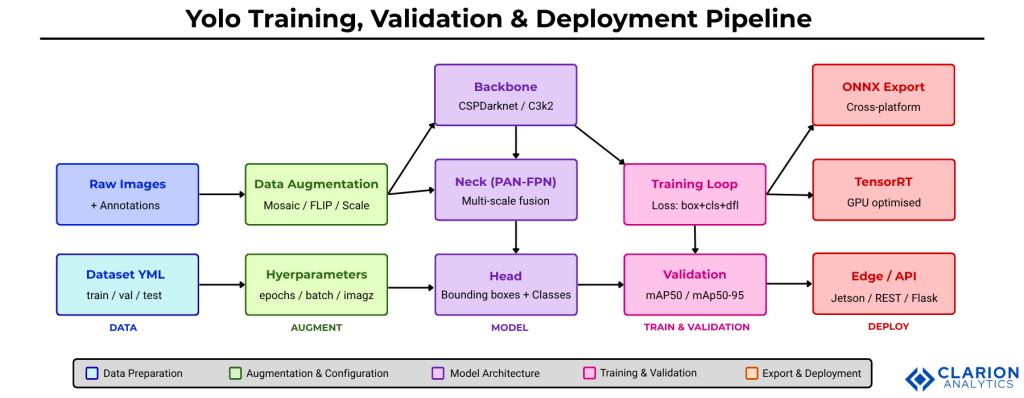
Figure: End-to-end YOLO pipeline from raw data to production deployment. Data flows through augmentation into the three-part model architecture (Backbone to Neck to Head), is refined through the training loop against validation metrics, then exported to ONNX, TensorRT, or edge-optimised formats for real-world inference. Build each stage as an independent, testable unit before integrating.
How to Train a YOLO Model on a Custom Dataset
Training a custom YOLO model involves four sequential steps: preparing an annotated dataset, writing a YAML configuration file, running the training command with chosen hyperparameters, and reviewing loss curves to diagnose underfitting or overfitting.
Step 1: Prepare Your Dataset
Label images in YOLO format (class_id x_center y_center width height, all normalised 0-1). Tools such as Roboflow support dataset versioning, augmentation, and direct export to the YOLO YAML format expected by Ultralytics. Aim for at least 300 images per class at training time; more is always better but diminishing returns set in past 5,000 per class for most industrial tasks.
Step 2: Configure training.yaml
The YAML file declares the path to your train and val image folders and the class list. Keep it version-controlled alongside model checkpoints.
Code Snippet 1 – Training YOLO11 on a Custom Dataset
Source: ultralytics/ultralytics, train.py (Ultralytics GitHub, last commit March 2026, 55k+ stars)
This snippet demonstrates the full training-to-export loop in under 15 lines of Python. The model.train() call manages learning-rate scheduling, data loading, mixed-precision training, and checkpointing automatically. The subsequent model.export() converts best.pt into a portable ONNX graph ready for deployment on any runtime.
Fewer than 15 lines of Python take you from a pretrained YOLO checkpoint to an ONNX-exported production model. The real work is in your data.
Validation: Understanding mAP, Precision, and Recall
Validation measures how well your model generalises beyond training data. The primary metric for object detection is mAP50-95, mean Average Precision averaged over IoU thresholds from 0.50 to 0.95. A high mAP50 with low mAP50-95 signals a model that draws loose bounding boxes, acceptable for counting tasks but unusable for pick-and-place robotics.
Reading the Validation Output
Run validation with a single command after training completes. The output table shows per-class AP, overall mAP50, mAP50-95, precision, and recall. Precision above 0.85 with recall below 0.60 typically indicates your confidence threshold is too high. Lower it to 0.25 and re-validate before increasing dataset size.
Code Snippet 2 – Validation and Inference
Source: ultralytics/ultralytics, val.py (Ultralytics GitHub)
This validation snippet runs the full metrics suite in one call and prints the four numbers every engineering review requires. The split="test" argument ensures you are measuring on genuinely unseen data rather than the validation fold used during training.
YOLO Variant Comparison: Choosing the Right Model
No single YOLO variant is best for every use case. The table below compares three current models across key deployment dimensions.
| Model | Key Strength | Best Used When | Export Targets |
|---|---|---|---|
| YOLOv8 / YOLO11 | Broad task support: detect, segment, pose, classify | You need one model for multiple vision tasks or a well-documented ecosystem | ONNX, TensorRT, CoreML, TFLite |
| YOLO26 (2025) | NMS-free end-to-end inference, 43% faster CPU speed | Edge deployment on CPU-only devices or latency-critical IoT systems | ONNX, TensorRT, OpenVINO |
| YOLO-World (CVPR 2024) | Open-vocabulary detection with zero-shot capability (35.4 AP, 52 FPS on V100) | Categories change at runtime or zero-shot detection is required without re-training | ONNX; re-param weights for deployment |
Deploying YOLO: From ONNX to Production Inference
Deployment starts the moment you run model.export(). The right export target depends on where inference runs and what latency budget you have. Exporting to ONNX is the most portable starting point. From there, TensorRT adds GPU-specific kernel fusion for 2-4x additional throughput on NVIDIA hardware.
Edge Deployment
YOLO26n targets edge deployment explicitly, delivering real-time CPU inference on devices without GPUs (Ultralytics, 2025). For Jetson devices, OpenVINO and TensorRT export paths are both supported and benchmarked in the official docs. Always validate your exported model against the Python model before going to production.
Cloud and API Deployment
Wrap your ONNX model in a FastAPI endpoint, containerise with Docker, and serve behind a load balancer. For managed inference without custom infrastructure, Roboflow Inference provides a hosted REST API that accepts images and returns structured JSON detections.
Exporting to ONNX is step one. Validating the exported model against your Python baseline is step zero-point-five, and most teams skip it.
Optimising YOLO for Production: Hyperparameters and Post-Training
Three optimisation levers have the largest impact on production mAP: data augmentation strategy, learning rate scheduling, and model quantisation for inference speed.
Augmentation Strategy
YOLOv4 introduced Mosaic augmentation, combining four training images into one to increase small-object density. Research published in PMC (2025) extended this with Mosaic-9 and Bidirectional Feature Pyramid Networks (BiFPN) for challenging small-object detection scenarios. Apply mosaic=True and mixup=0.1 as defaults; remove mosaic in the final 10% of epochs to allow the model to stabilise on clean images.
Hyperparameter Tuning
Start with epochs=100, batch=16, and imgsz=640. Increase imgsz to 1280 only if your objects are small and your GPU VRAM allows. Use patience=50 for early stopping. Learning rate warmup for the first 3 epochs prevents gradient explosions on small datasets.
Post-Training Quantisation
INT8 quantisation via TensorRT reduces model size by 4x and inference time by 2-3x with less than 1% mAP loss on most benchmarks. Use Ultralytics export with int8=True and calibrate on a representative sample of your real-world images, not the COCO benchmark, for calibration that reflects your actual domain distribution.
INT8 quantisation delivers 2-3x faster inference with under 1% mAP loss when calibrated on domain-specific data. Skip COCO calibration if your target domain differs from natural images.
Frequently Asked Questions
How long does it take to train a YOLO model on a custom dataset?
Training YOLO11n for 100 epochs on a dataset of 2,000 images takes roughly 30 to 60 minutes on a single NVIDIA T4 GPU. Larger models like YOLO11x on 10,000+ images can take 6 to 12 hours. Use pretrained weights as a starting checkpoint to cut training time by 40 to 60% compared to training from scratch.
What is the difference between mAP50 and mAP50-95?
mAP50 measures Average Precision at a single IoU threshold of 0.50, meaning a predicted box that overlaps 50% with the ground truth counts as correct. mAP50-95 averages across 10 IoU thresholds from 0.50 to 0.95, rewarding tighter boxes. Use mAP50 for simple counting tasks and mAP50-95 for precision-sensitive applications like robotic manipulation.
Which YOLO model should I use for edge deployment on a CPU?
Choose YOLO26n or YOLO11n for CPU-only edge inference. YOLO26n delivers up to 43% faster CPU throughput than previous generations by eliminating the NMS post-processing step. For NVIDIA Jetson, add TensorRT export. Avoid YOLO26x or YOLO11x on CPU; their accuracy gains do not justify the latency cost outside of cloud inference contexts.
How do I prevent YOLO from overfitting on a small dataset?
Enable mosaic augmentation, set dropout=0.1 in the head, and reduce epochs to 50 if your dataset has fewer than 500 images. Transfer learning from a COCO-pretrained checkpoint is the single most effective technique. Freeze the backbone layers for the first 10 epochs and fine-tune the full model from epoch 11 onward. Validate on a held-out split every epoch and use early stopping with patience=20.
Can I deploy YOLO without a dedicated GPU in production?
Yes. YOLO26n and YOLO11n are explicitly designed for CPU-only inference. Export to ONNX or OpenVINO, then serve with the Ultralytics Python API or a FastAPI endpoint. For batch workloads, CPU inference at 15 to 30 FPS on modern server CPUs is achievable. For real-time video streams requiring 30+ FPS, a GPU or NPU accelerator is strongly recommended.
Conclusion: Build the Pipeline, Not Just the Model
Three insights stand above the rest. First, model variant selection is a deployment decision, not a research one. Match the model size to your latency budget before training. Second, validation on a true held-out test set is non-negotiable. Teams that skip this discover accuracy regressions in production weeks too late. Third, export format matters as much as architecture. An ONNX model on TensorRT will outperform a larger PyTorch model on the same GPU hardware.
The computer vision market is growing at nearly 20% annually, and YOLO model deployment remains the fastest path from annotated dataset to production inference. The question is no longer whether YOLO fits your use case. The question is: which part of your pipeline is the current bottleneck?
About the Author: Imran Akthar

Related Posts