PaddleOCR is an open-source, production-ready OCR and document AI engine developed by Baidu’s PaddlePaddle team. It converts images and PDFs into structured JSON or Markdown output using a modular three-stage pipeline: text detection, orientation classification, and text recognition. Version 3.0 (2025) adds layout analysis, table parsing, and LLM-native key-information extraction, supporting over 100 languages with sub-100-million-parameter models that rival billion-parameter vision-language models in accuracy.
Why Document Processing Automation Is Now a Board-Level Priority
The global intelligent document processing (IDP) market was valued at USD 2.3 billion in 2024 and is projected to reach USD 12.35 billion by 2030 at a 33.1% CAGR, according to Grand View Research (2025). Organisations are no longer asking whether to automate document workflows. They are asking which engine to build on.
The pressure is real. A McKinsey global survey found that 70% of organisations are already piloting business-process automation, including document workflows in at least one business unit (2024). Nearly 90% plan to scale those initiatives enterprise-wide within the next two to three years.
The finance sector leads adoption. The BFSI segment held approximately 40% of global IDP market share in 2024 (Precedence Research, 2025), driven by invoice processing, KYC compliance, and contract review. Healthcare and legal are growing fastest, with teams processing millions of unstructured pages that no manual workforce can keep pace with.
“Gartner research shows organisations implementing intelligent document processing achieve up to 80% efficiency gains in invoice processing alone.”
What PaddleOCR Actually Does – Core Capabilities Explained
PaddleOCR is not a single model. It is a modular toolkit with three distinct pipelines that can be used independently or chained together. Each solves a different layer of the document intelligence problem.
PP-OCRv5 – Universal Text Recognition
PP-OCRv5 is the text extraction backbone. According to the PaddleOCR 3.0 Technical Report (Cui et al., 2025, arXiv:2507.05595), PP-OCRv5 achieves a 13-point accuracy improvement over its predecessor, PP-OCRv4. It is the first single model to support five text types simultaneously: Simplified Chinese, Traditional Chinese, Chinese Pinyin, English, and Japanese. The recognition architecture uses a dual-branch SVTR-HGNet approach, combining an attention-based branch for accuracy with a CTC-based branch for inference speed.
Two deployment variants ship with every install: a server model optimised for GPU throughput, and a mobile model tuned for CPU-only environments. This lets the same codebase run in a cloud batch-processing cluster and on an edge device, a critical flexibility for enterprise architects.
PP-StructureV3 – Document Layout Parsing
PP-StructureV3 goes beyond text lines and tackles full document structure. It parses complex PDFs into Markdown or JSON files that preserve column order, heading hierarchy, table structure, embedded formulas, and chart content. According to the OmniDocBench benchmark (CVPR 2025), PP-StructureV3 leads both open- and closed-source solutions on complex PDF parsing, including commercial offerings.
The pipeline handles seal recognition, chart-to-table conversion, and nested formula extraction. In practice, teams building RAG systems find this output far cleaner to chunk than raw PDF text extraction.
PP-ChatOCRv4 – Intelligent Information Extraction
PP-ChatOCRv4 connects OCR output to an LLM for key-information extraction. It is natively powered by ERNIE 4.5 and achieves a 15-percentage-point accuracy improvement over PP-ChatOCRv3 (PaddleOCR docs, 2025). Teams can ask natural-language questions about documents, for example, “extract all payment terms from this contract batch”, and receive structured answers without writing custom post-processing logic.
PaddleOCR Architecture – How the Pipeline Flows
The PP-StructureV3 pipeline runs five sequential modules: preprocessing, PP-OCRv5 (detection, orientation classification, recognition), layout analysis, document item recognition, and post-processing to Markdown or JSON. Understanding this flow is essential before choosing which modules to enable in your deployment.
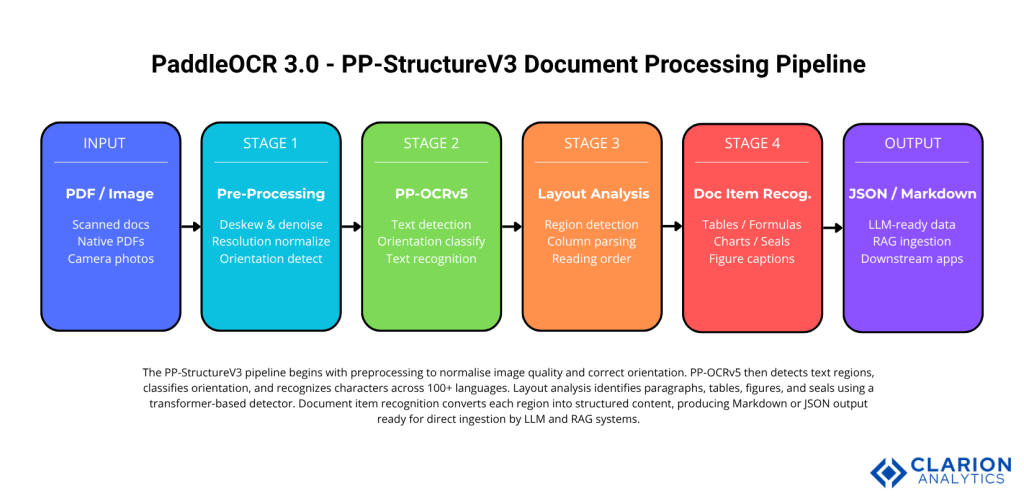
Figure 1: The PP-StructureV3 pipeline. Preprocessing normalises image quality and corrects orientation. PP-OCRv5 handles detection, classification, and multi-type text recognition. Layout analysis identifies paragraphs, tables, figures, and seals using a transformer-based detector. Document item recognition converts each region into structured content, outputting Markdown or JSON ready for LLM and RAG ingestion.
The preprocessing module normalises image quality, corrects skew, and standardises resolution. PP-OCRv5 detects text bounding boxes, classifies orientation, and recognises characters. Layout analysis applies a transformer-based region detector to identify paragraphs, multi-column layouts, tables, figures, and seals. Document item recognition converts each identified region into its structured representation. Post-processing assembles all regions into a single Markdown or JSON file, restoring reading order across complex layouts.
This architecture is described in detail in the PaddleOCR 3.0 Technical Report (arXiv:2507.05595, 2025). The modular design means each stage can be replaced or fine-tuned independently on domain-specific datasets.
“PaddleOCR’s sub-100M-parameter models rival billion-parameter vision-language models in document parsing accuracy at a fraction of the compute cost.”
Real-World Use Cases – Where Teams Are Deploying PaddleOCR
The most common production deployments span finance, healthcare, legal, and AI infrastructure. Each domain has specific document challenges that PaddleOCR’s modular architecture addresses directly.
Financial Document Automation
Invoice processing is the flagship use case. Gartner research cited in Straits Research (2025) notes that IDP implementations in invoice workflows have delivered up to 80% efficiency gains. PaddleOCR’s PP-StructureV3 handles multi-column invoice layouts, extracts line-item tables, and preserves vendor address fields in structured JSON. Teams processing thousands of invoices daily use the server-side model with GPU acceleration for sub-second inference per page.
Legal and Contract Analysis
Contract review requires precision on dense text with complex formatting: numbered clauses, embedded tables of rates, defined terms in sidebars, and signature blocks. PP-StructureV3 handles all of these. Teams at legal-tech companies run PaddleOCR locally, no data leaves the building, then feed structured Markdown into a fine-tuned LLM that flags non-standard clauses. Data residency is non-negotiable in legal contexts, and PaddleOCR’s Apache 2.0 licence makes on-premises deployment straightforward.
RAG Pipeline Document Ingestion
This is where PaddleOCR has seen its fastest growth. Projects like MinerU (opendatalab/MinerU) and RAGFlow (infiniflow/ragflow) embed PaddleOCR as their core document ingestion engine. RAGFlow uses PP-StructureV3 to convert uploaded PDFs into structured Markdown before chunking and embedding. The structured output means chunk boundaries align with logical document sections rather than arbitrary character limits, reduce retrieval hallucinations in downstream LLM responses.
Getting Started – A Practical Implementation Guide
PaddleOCR 3.0 installs via a single pip command. The Python API requires three to four lines for the most common workflows. The CLI handles batch jobs without any code.
Install:
bash
pip install paddleocrSource: PaddlePaddle/PaddleOCR – OCR pipeline docs
Snippet 1 – Basic text extraction with PP-OCRv5:
This initialises the PP-OCRv5 server model, runs the full detection-classification-recognition pipeline on the input image, and returns a list of text blocks with bounding box coordinates and confidence scores. The lang parameter supports 100+ language codes. Swapping "en" for "ch" activates the multilingual model for mixed Chinese-English documents without any other code change.
Source: PaddlePaddle/PaddleOCR – PP-StructureV3 pipeline docs
Snippet 2 – Full document parsing to Markdown with PP-StructureV3:
This converts a multi-page PDF into one Markdown file per page, preserving table structure, reading order, heading levels, and formula notation. The output folder feeds directly into a RAG chunking pipeline.
“In practice, teams integrating PaddleOCR into a RAG pipeline find that structured Markdown output from PP-StructureV3 reduces chunking errors and retrieval hallucinations significantly.”
PaddleOCR vs. Alternatives – Choosing the Right Tool
The right tool depends on your accuracy requirements, deployment constraints, language coverage, and cost model.
| Option | Key Strength | Best Used When |
|---|---|---|
| PaddleOCR 3.0 | Highest accuracy on complex layouts, on-premises, 100+ languages, Apache 2.0 licence | Teams need data privacy, LLM pipeline integration, or multilingual support without per-API-call costs |
| Tesseract OCR | Simple setup, widely supported, mature FOSS | Single-language, low-volume, plain-text documents with no layout complexity |
| GPT-4o Vision | Natural language Q&A over documents, strong visual reasoning | Ad hoc document interrogation, low-volume usage where token cost is acceptable |
| Google Document AI | Managed service, strong pre-trained vertical models | Enterprises wanting zero infrastructure overhead in cloud-native stacks |
| Azure Form Recognizer | Deep Microsoft ecosystem integration, strong form extraction | Organisations already on Azure needing turnkey invoice and form processing |
For a detailed accuracy comparison, see the DeepSeek-OCR vs GPT-4-Vision vs PaddleOCR comparison (2025).
“For teams building production document pipelines, open-source PaddleOCR eliminates vendor lock-in while matching the accuracy of paid cloud APIs on structured layouts.”
Frequently Asked Questions
How do I install PaddleOCR for document processing? Run pip install paddleocr in any Python 3.8+ environment. PaddleOCR 3.0 installs core dependencies automatically. For GPU support, first install the matching PaddlePaddle GPU wheel for your CUDA version, then install paddleocr. The CLI is available immediately; the Python API requires one import. Full guidance is at paddleocr.ai.
Can PaddleOCR handle scanned PDFs and handwritten documents? Yes. PP-OCRv5 includes an orientation correction model and improved handwriting recognition, achieving a 13-point accuracy gain over PP-OCRv4 on handwritten content (Cui et al., 2025). For extreme cases, very messy cursive or historical scripts, PaddleOCR-VL-1.5 (released January 2026) achieves 94.5% accuracy on OmniDocBench and is the recommended option.
How does PaddleOCR integrate with a RAG or LLM pipeline? PaddleOCR provides a native MCP (Model Context Protocol) server for direct integration with agent applications including Claude Desktop. For Python pipelines, PP-StructureV3 outputs clean Markdown that feeds directly into embedding models. Projects like RAGFlow and MinerU demonstrate production-grade PaddleOCR-to-RAG pipelines with full source code available on GitHub.
Is PaddleOCR accurate enough for production enterprise use? PP-StructureV3 leads both open- and closed-source solutions on the OmniDocBench benchmark (CVPR 2025). PaddleOCR-VL-1.5 reaches 94.5% accuracy on OmniDocBench v1.5. For printed documents and standard layouts, PP-OCRv5 alone is production-ready. For complex multi-element documents, combine PP-StructureV3 with domain fine-tuning on a sample of your own document types.
What is the difference between PaddleOCR and Tesseract for document parsing? Tesseract performs single-column text extraction with no native layout understanding. PaddleOCR adds layout analysis, table structure recognition, formula parsing, and multi-language mixed-script support. Tesseract is simpler for plain documents. PaddleOCR is the better choice whenever documents contain tables, multi-column layouts, or mixed scripts. See the PaddleOCR vs Tesseract comparison on Koncile (2025) for a deeper analysis.
Three Takeaways and What to Build Next
Three things matter most when evaluating PaddleOCR for your stack. First, the modular architecture means you deploy only what you need: PP-OCRv5 for raw text, PP-StructureV3 for complex layouts, PP-ChatOCRv4 for LLM-backed extraction. Second, accuracy on complex documents is now competitive with cloud APIs and billion-parameter VLMs, at a fraction of the compute cost and with full data residency control. Third, the ecosystem is already there, over 60,000 GitHub stars and production integrations in MinerU, RAGFlow, and OmniParser mean the community tooling and deployment patterns are proven.
The IDP market will grow from USD 2.3 billion to over USD 12 billion by 2030. The teams that gain a structural advantage will be those who build on open, composable engines rather than locking budget into per-page cloud API costs.
The question worth sitting with: if your most document-intensive workflow were fully automated today, what would your team spend those reclaimed hours building?
About the Author: Imran Akthar

Related Posts
Table of Content
- Why Document Processing Automation Is Now a Board-Level Priority
- What PaddleOCR Actually Does – Core Capabilities Explained
- PaddleOCR Architecture – How the Pipeline Flows
- Real-World Use Cases – Where Teams Are Deploying PaddleOCR
- Getting Started – A Practical Implementation Guide
- PaddleOCR vs. Alternatives – Choosing the Right Tool
- Frequently Asked Questions
- Three Takeaways and What to Build Next