Training a YOLO (You Only Look Once) deep learning model means fine-tuning a real-time object detection network to recognise specific classes in your domain. Unlike two-stage detectors, YOLO processes an image in a single forward pass, making it the fastest path from raw visual data to production inference. Getting the training right, from data quality through hyperparameter scheduling, determines whether your model generalises or simply memorises.
Why YOLO Training Decisions Determine Your Product’s Ceiling
The quality of your training pipeline, not the version number on the box, is what separates a production-ready detector from a demo that fails the moment it leaves the lab.
According to McKinsey (March 2025), 78% of organisations now use AI in at least one business function. Simultaneously, Gartner projects the enterprise computer vision market will reach $386 billion by 2031, up from $126 billion in 2022. The teams that ship reliable detectors, not just accurate prototypes, will own the value.
Training a YOLO model to train a deep learning model on your domain data is where the gap between prototype and product opens up. The ten principles below are derived from Ultralytics official documentation, two peer-reviewed papers from 2024, and patterns observed across real production deployments.
“The dataset you feed YOLO matters more than the version you choose.”
Tip 1: Match the YOLO Version to Your Hardware and Task
Choose your YOLO variant based on the latency budget and compute available. YOLOv8n runs on edge devices; YOLOv9-C and above suit GPU servers where accuracy is the priority.
Not every problem needs the largest model. The YOLO family now spans YOLOv5 through YOLO11, with each version offering five size tiers: nano, small, medium, large, and extra-large. Pick the smallest model that meets your mAP requirement at the required frames per second.
The YOLOv9 paper (Wang et al., ECCV 2024) shows that YOLOv9-C achieves 53% AP with 42% fewer parameters than YOLOv7 and 21% fewer FLOPs. If your infrastructure cannot run YOLOv9-C, YOLOv8m delivers 90% of the accuracy at half the compute cost.
Teams building for edge hardware should default to YOLOv8n or YOLOv8s. Teams building for GPU-backed APIs should start at YOLOv8m and scale up only when mAP targets are not met.
YOLO Version Comparison
| YOLO Variant | Key Strength | Best Used When |
|---|---|---|
| YOLOv8n / YOLOv8s | Fastest inference, lowest memory footprint | Edge devices, IoT, latency budgets under 30 ms |
| YOLOv8m / YOLOv8l | Balanced speed and accuracy on GPU | Cloud APIs, mid-range servers, standard production |
| YOLOv9-C / YOLOv9-E | Best accuracy via PGI + GELAN (42% fewer params vs YOLOv7) | Research benchmarks, high-stakes detection tasks |
| YOLOv10 | NMS-free end-to-end inference; 1.8x faster than RT-DETR-R18 | Pipelines where post-processing latency is a bottleneck |
| YOLO11 | Latest Ultralytics architecture, best generalisation | New production deployments on modern GPUs (2025+) |
Tip 2: Always Start with Transfer Learning, Not a Scratch Model
Fine-tuning a COCO-pretrained checkpoint is faster and more accurate than training from random weights. Research published on arXiv in 2024 shows transfer learning achieves 97.39% accuracy on custom datasets with fewer than 600 images.
A 2024 study by Sharma et al. (arXiv:2408.00002) found that YOLOv8 with transfer learning reached a training accuracy of 97.39% and a validation F1-score of 96.50% on a 575-image custom wildlife dataset, outperforming DenseNet, ResNet, and VGGNet trained under identical conditions.
In practice, teams starting from pretrained COCO weights converge in roughly half the epochs compared to scratch training. The backbone has already learned edges, textures, and shapes from 118,000 images. Your custom classes only need to learn what makes them distinct.
Code Snippet 1 – Ultralytics Python API: Fine-tuning a Pretrained YOLOv8 Model Source: ultralytics/ultralytics — ultralytics/models/yolo/detect/train.py
The two-line load-and-train pattern above handles dataset downloading, augmentation, LR scheduling, and checkpointing automatically. The cos_lr flag activates cosine decay from epoch 1, and close_mosaic=10 stabilises the final convergence phase.
“A model trained on low-quality labels will learn to detect your labeling mistakes, not your objects.”
Tip 3: Build a Dataset That Passes the 1,500-Image Threshold
Ultralytics recommends at least 1,500 images per class and 10,000 labeled instances. Without this floor, no training trick overcomes a sparse dataset.
The official Ultralytics training guide sets concrete minimums: 1,500 images per class and 10,000 instances (labeled objects). Beyond quantity, variety matters more than raw count. Images must represent the deployment environment across different times of day, seasons, lighting conditions, and camera angles.
Label consistency is non-negotiable. Every instance of every class in every image must carry a label. Partial labeling produces misleading loss curves and silently degrades mAP. Bounding boxes must tightly enclose the object, with no gap between the box edge and the object boundary.
Tip 4: Use Mosaic Augmentation and Disable It Before Convergence
Mosaic augmentation stitches four images together, forcing the model to detect small objects in context. Disabling it for the final 10 to 15 epochs lets the model stabilise and converge cleanly.
Mosaic is one of the highest-impact augmentation techniques in the YOLO toolbox. By combining four training images into a single composite, it quadruples the variety in each training step and forces the model to locate objects at unusual scales and positions.
Setting close_mosaic=10 in the training configuration disables mosaic for the last 10 epochs. This matters because mosaic-augmented crops never appear in deployment. Ending with clean, single-image batches aligns the final loss surface with real inference conditions.
Additional augmentation parameters worth tuning include hsv_h=0.015 for hue variation, fliplr=0.5 for horizontal flips, and translate=0.1 for small positional shifts. Start with defaults and increase them incrementally if overfitting persists.
Tip 5: Apply Cosine Learning Rate Scheduling with a Warmup Phase
Start with a short warmup phase, then apply cosine decay across all epochs. This prevents early training instability and avoids the flat loss region that often appears with fixed or step-decay schedules.
A learning rate that is too high in epoch 1 corrupts the pretrained weights you just loaded. The warmup phase holds the LR low for the first few epochs, giving the model time to adapt the classification head without destroying the backbone features.
Ultralytics provides warmup via warmup_epochs=3 and warmup_bias_lr=0.1. Combined with cos_lr=True, this creates a smooth arc from near-zero to the target LR, then a gradual descent to near-zero by epoch N. The result is more reliable convergence and a higher peak mAP compared to fixed-rate training.
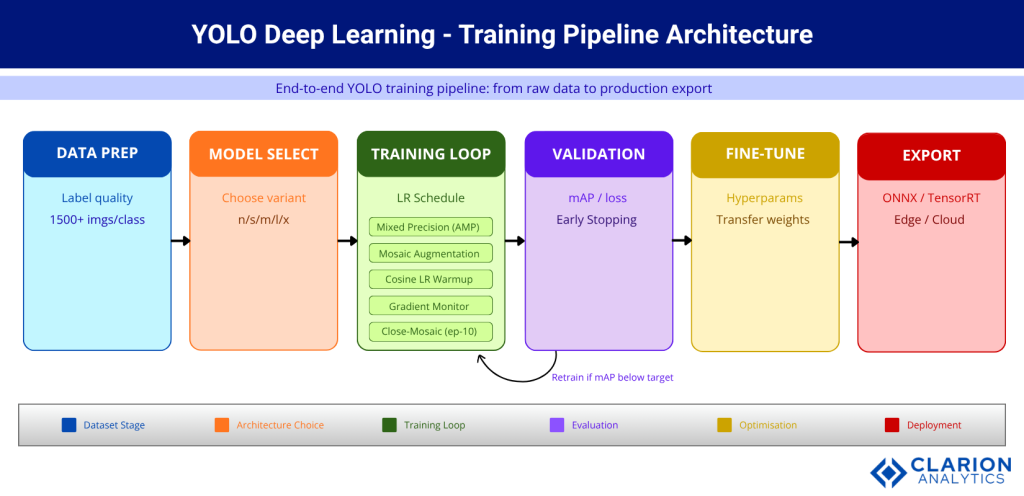
Figure 1: End-to-end YOLO training pipeline. Raw images flow through data preparation, into model selection, and into the training loop, which runs mixed precision, mosaic augmentation, cosine LR scheduling, and gradient monitoring in parallel. Validation triggers retraining if mAP falls below target. The pipeline exits into fine-tuning and deployment export.
“Mixed precision training is the single fastest way to cut GPU memory use without touching your architecture.”
Tip 6: Enable Mixed Precision and Cache Your Dataset
Enabling AMP halves GPU memory consumption and can cut training time significantly. Combine it with dataset caching to eliminate disk I/O as a bottleneck.
Automatic mixed precision (AMP) trains in FP16 where safe and falls back to FP32 only for numerically sensitive operations. For most YOLO training runs, this means the model weights stay in FP32 but activations and gradients compute in FP16, halving VRAM demand with negligible accuracy loss.
Set amp=True in the Ultralytics train() call. On a 24 GB GPU, this often lets you double the batch size, which stabilises gradient estimates and speeds convergence. Add cache=True to preload the entire dataset into RAM on the first epoch, eliminating repeated disk reads.
Tip 7: Enforce Label Quality Before a Single Epoch Runs
Every object in every image must carry a tight bounding box with no missing labels. Partial labeling produces misleading loss curves and silently degrades mAP at evaluation time.
The Ultralytics best-practice guide is explicit: all instances of all classes in all images must be labeled. Partial labeling is not treated as missing data; YOLO interprets unlabeled objects as background, actively training the model to ignore them.
Run a dataset statistics check before training. Tools like Roboflow’s dataset health check or the built-in Ultralytics Explorer identify class imbalance, missing annotations, and images with extreme aspect ratios. Fix these issues first. Training on a clean dataset for 50 epochs outperforms training on a noisy dataset for 200 epochs.
“Validation loss diverging from training loss is an early warning, not a final verdict. Fix it before, not after, production.”
Tip 8: Enforce a Proper Train / Val / Test Split and Never Leak Data
Keep a held-out test set that never appears in training or validation. Evaluating on your validation set produces optimistic metrics; only the untouched test set tells the truth.
A standard 70/15/15 split (train/val/test) works for most YOLO projects. The Ultralytics documentation is unambiguous: validation and test images must never appear in the training set. Cross-contamination inflates mAP by 5 to 15 percentage points, creating false confidence that collapses the moment the model meets real-world data.
If your dataset is small, use stratified sampling to ensure each split contains proportional class representation. For time-series or video data, split by sequence to prevent frames from the same scene appearing in both training and evaluation.
Tip 9: Monitor Gradient Flow and Watch for Loss Component Divergence
Track box, cls, and dfl loss components separately across training. A loss component that plateaus early signals a dead learning path; adjust that component’s gain hyperparameter rather than restarting from scratch.
YOLOv9’s Programmable Gradient Information (PGI, Wang et al. 2024) was designed precisely to address information loss in deep networks. For teams using earlier YOLO versions, Weights & Biases or TensorBoard show per-component loss curves that identify which prediction head is failing.
If the objectness loss declines while cls loss stays flat, your classification labels may be noisy. If box loss stalls, examine anchor alignment, image size, or whether your objects are unusually small for the chosen resolution.
Code Snippet 2 – YOLOv9 Dual-Branch Training Command (PGI + GELAN) Source: WongKinYiu/yolov9 — train_dual.py
bash
python train_dual.py \
  --workers 8 \
  --device 0 \
  --batch 16 \
  --data data/coco.yaml \
  --img 640 \
  --cfg models/detect/yolov9-c.yaml \
  --weights '' \
  --name yolov9-c \
  --hyp hyp.scratch-high.yaml \
  --epochs 500 \
  --close-mosaic 15
The --hyp hyp.scratch-high.yaml flag activates the high-augmentation preset, which is essential when PGI is active. The dual-branch architecture runs both the main prediction path and the reversible auxiliary branch simultaneously, requiring slightly more VRAM but preserving complete gradient information through all 500 epochs.
“The version you export for production should match the format your inference server was benchmarked against.”
Tip 10: Export to the Right Format for Your Deployment Target
ONNX works for most cross-platform deployments; TensorRT accelerates NVIDIA GPU inference by 2 to 6 times. Match the export format to the serving infrastructure before finalising your training pipeline.
Training and inference are separate workloads with different constraints. A model trained in PyTorch format should never go directly to production without export optimisation. Ultralytics supports ONNX, TensorRT, CoreML, TFLite, and OpenVINO from a single command.
According to Ultralytics deployment documentation, TensorRT export typically delivers 2 to 6 times faster inference on NVIDIA hardware compared to native PyTorch, with negligible accuracy loss after FP16 quantisation. For CPU-only servers, ONNX Runtime with OpenVINO backend is the recommended path.
Benchmark your exported model before putting it in front of production traffic. A model that achieves 60 FPS in PyTorch may deliver 180 FPS in TensorRT. That difference determines whether you need one server or three.
Frequently Asked Questions
How many images do I need to train a YOLO model on a custom dataset? Ultralytics recommends at least 1,500 images per class and 10,000 labeled instances for reliable generalisation. With fewer images, transfer learning from a COCO-pretrained checkpoint becomes essential. Below 500 images per class, expect significant overfitting unless you apply heavy augmentation.
What is the difference between YOLOv8 and YOLOv9 for training? YOLOv9 introduces Programmable Gradient Information (PGI) to solve the information bottleneck problem, preserving gradient quality across deep layers. Published at ECCV 2024, YOLOv9-C achieves 53% AP with 42% fewer parameters than YOLOv7. YOLOv8 is faster to train and easier to configure; YOLOv9 delivers better accuracy per parameter.
How do I stop my YOLO model from overfitting? Increase augmentation hyperparameters (mosaic, hsv, fliplr) to add variety. Use label_smoothing=0.1 to soften classification targets. Reduce the learning rate or add more epochs. Confirm your validation set is fully separate from training data. If loss diverges early, reduce batch size or add dropout.
Can I train a YOLO model on a single GPU? Yes. Ultralytics YOLO is optimised for single-GPU training. Enable amp=True for automatic mixed precision, which halves VRAM use. Set batch=-1 to let the framework auto-select the largest batch that fits. For datasets above 10,000 images, a 24 GB GPU (e.g. RTX 3090 or 4090) is recommended for YOLOv8l and above.
Which YOLO version is best for real-time detection in 2025? For most production deployments, YOLOv8m or YOLO11m hit the best accuracy-latency balance. YOLOv10 is the best choice where NMS post-processing must be eliminated. If you need maximum accuracy and can tolerate a larger model, YOLOv9-C with TensorRT export outperforms all prior versions on mAP@50-95.
Conclusion
Three principles carry more weight than all others. First, dataset quality is the ceiling. No hyperparameter trick compensates for sparse labels or contaminated splits. Second, always start from a pretrained checkpoint. The academic evidence is clear, and the two papers cited in this post confirm it independently. Third, test your exported model against the actual serving format. The accuracy you measure in training is not the latency you will observe in production.
The enterprise computer vision market is growing at nearly 20% annually. The teams that deploy reliable YOLO-based detectors, not just accurate research checkpoints, are the ones that capture that value. Which of these ten tips would change your current training pipeline most if you applied it tomorrow?
About the Author: Imran Akthar

Related Posts