
What is FLUX.1? FLUX.1 is a family of 12-billion-parameter rectified flow transformers developed by Black Forest Labs for state-of-the-art text-to-image generation. It consists of three variants: [pro] (API-only), [dev] (open weights, non-commercial), and [schnell] (open weights, Apache 2.0). ComfyUI is the leading node-based GUI for running diffusion pipelines. Together on Google Colab, they deliver professional-grade image generation without local GPU hardware.
Why FLUX.1 Changes the Calculus for Engineering Teams
According to Gartner (2024), the worldwide generative AI models market grew 320% in a single year to reach $5.7 billion, the fastest-growing software segment on record. Meanwhile, McKinsey’s 2024 Global Survey found that more than one-third of organizations now use generative AI specifically to create images, up from near-zero just two years earlier.
For engineering teams, those numbers translate into a simple question: should you pay API fees every time a designer needs an image, or build a pipeline you control entirely? FLUX.1 ComfyUI Google Colab makes the second option achievable without owning a single high-end GPU.
The hardware barrier has historically been brutal. A FLUX.1 [dev] model at full FP16 precision demands 32 GB of VRAM. Very few local development machines carry that. Google Colab’s free tier provides a Tesla T4 with 15 GB of VRAM, and its Pro tier provides an NVIDIA L4 with 24 GB. With the right quantized variant, both are sufficient.
“Open-weight models like FLUX.1 give engineering teams full control over inference cost, data privacy, and workflow customization, three things no API can fully guarantee.”
What Makes FLUX.1 Different from Stable Diffusion
FLUX.1 uses a rectified flow transformer architecture with separate double-stream and single-stream transformer blocks, enabling superior prompt adherence and anatomical accuracy compared to SDXL or SD3 Medium. It outperforms Midjourney, DALL-E 3, and Stable Diffusion 3 on human-preference ELO scores, according to the 2025 arXiv paper “Demystifying Flux Architecture”.
The core difference is how text and image information mix during inference. Stable Diffusion models pass text tokens as a conditioning signal text guides the image, but they never attend jointly. FLUX.1’s architecture, as reverse-engineered in a 2025 arXiv study, runs text and image tokens through shared “double-stream” transformer blocks where both modalities attend to each other simultaneously. This produces far tighter alignment between complex prompt phrases and pixel-level spatial relationships.
The model also uses dual text encoders: a T5-XXL encoder for long-form semantic richness and an OpenAI CLIP encoder for visual-semantic alignment. Running both adds to VRAM demands, which is exactly why quantization variants exist.
The three FLUX.1 variants each occupy a different engineering trade-off:
| Variant | Key Strength | Best Used When |
|---|---|---|
| FLUX.1 [pro] | Highest quality, BFL-optimized | Production API calls; commercial license via BFL |
| FLUX.1 [dev] FP16 | Maximum open-weight quality | 24 GB+ VRAM; research and fine-tuning |
| FLUX.1 [dev] FP8 | Best quality/VRAM balance | 16 GB VRAM (Colab L4) or 12 GB with offloading |
| FLUX.1 [schnell] FP8 | Fastest generation (4 steps) | Rapid prototyping; modest quality trade-off |
| FLUX.1 [dev] Q5 GGUF | LoRA-compatible, compact | Free Colab T4 (15 GB) with LoRA fine-tuning |
| FLUX.1 [dev] Q4 GGUF | Smallest footprint | Low-VRAM environments; speed priority |
Architecture Deep Dive – How FLUX.1 Processes Your Prompt
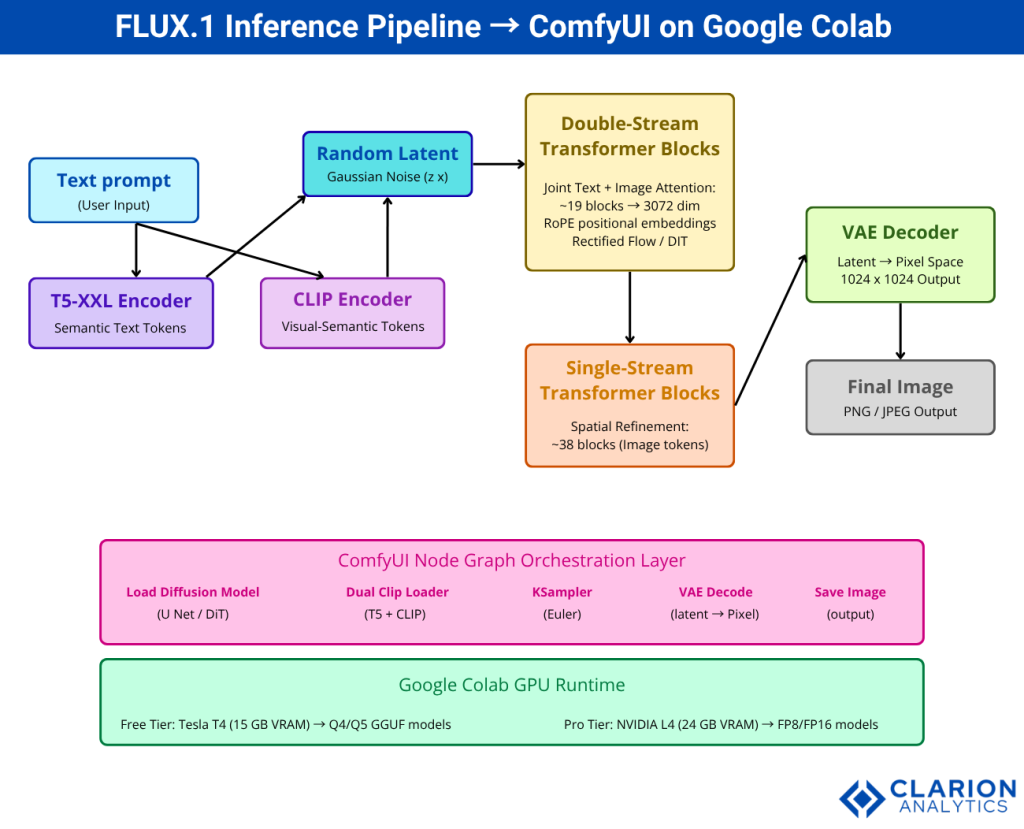
FLUX.1 processes text through dual encoders (T5-XXL for semantic richness and OpenAI CLIP for visual alignment), then applies double-stream transformer blocks where text and image tokens attend jointly, followed by single-stream blocks that refine spatial structure, and finally a VAE decoder maps the latent representation to pixel space.
The rectified flow training paradigm, the mechanism FLUX.1’s developers confirmed in public statements, differs from the DDPM noise schedule used by earlier Stable Diffusion models. Rather than gradually adding and reversing Gaussian noise, rectified flow learns straight-line trajectories in latent space from noise to image. This allows high-quality results in fewer inference steps. FLUX.1 [dev] typically needs 20-50 steps; the distilled [schnell] variant needs only four.
From the decoder side, the VAE compresses the 1024×1024 pixel space into a compact latent representation of roughly 128×128 tokens before the transformer processes them. This compression is what makes a 12B-parameter model tractable on a consumer-class GPU at all.
The 1.58-bit FLUX paper (arXiv 2412.18653, 2024) went further, demonstrating that FLUX.1 can be quantized to ternary weights ({−1, 0, 1}) while retaining competitive image quality, validating the practical reliability of the Q4 and Q5 GGUF variants widely used on Colab.
Setting Up ComfyUI and FLUX.1 on Google Colab – Step by Step
Open a Colab notebook with a GPU runtime (T4 or L4), clone the ComfyUI repository, install the ComfyUI-GGUF custom node extension, download your chosen FLUX checkpoint, and expose the UI through a LocalTunnel URL. Total setup time is under 10 minutes.
The easiest starting point is the community notebook at sayantan-2/comfyui_colab_Flux, which pre-configures everything for the free T4 tier and supports FP8, Q5, and Q4 GGUF models with LoRA.
Snippet 1 – FluxPipeline inference via Diffusers Source: black-forest-labs/FLUX.1-dev, Hugging Face
This snippet loads the full BF16 model and enables enable_model_cpu_offload(), which moves model layers between GPU and CPU on demand. On a Colab T4 this still exceeds VRAM limits for the full model; use it on L4 or switch to a GGUF variant for the free tier.
Snippet 2 – Colab notebook cell for ComfyUI + GGUF FLUX setup Source: sayantan-2/comfyui_colab_Flux, GitHub
bash
# Cell 1: Clone ComfyUI and install dependencies
!git clone https://github.com/comfyanonymous/ComfyUI
%cd ComfyUI
!pip install -r requirements.txt

# Cell 2: Install ComfyUI-GGUF custom node for quantized model support
!git clone https://github.com/city96/ComfyUI-GGUF custom_nodes/ComfyUI-GGUF
!pip install -r custom_nodes/ComfyUI-GGUF/requirements.txt

# Cell 3: Download FLUX.1-dev Q5 GGUF checkpoint (~8 GB)
!wget -q -P models/unet \
  "https://huggingface.co/city96/FLUX.1-dev-gguf/resolve/main/flux1-dev-Q5_K_S.gguf"

# Cell 4: Launch ComfyUI with LocalTunnel
import subprocess, time
process = subprocess.Popen(
    ["python", "main.py", "--listen", "--port", "8188"],
    stdout=subprocess.PIPE
)
time.sleep(8)
!npx --yes localtunnel --port 8188
This four-cell setup clones ComfyUI, installs GGUF quantization support, downloads the Q5 checkpoint (recommended for free-tier LoRA work), and exposes the UI over a public URL. Run cells sequentially and click the tunnel link when it appears.
“Teams building this typically find that the Q5 GGUF variant on a free T4 runtime hits a practical sweet spot: LoRA support, tolerable generation time, and no out-of-memory crashes.”
ComfyUI reached 107K GitHub stars by early 2026 and ships weekly releases. It has had native FLUX.1 support since August 2024 per the Wikipedia page on ComfyUI. According to Gartner’s 2024 Hype Cycle for Generative AI, 40% of GenAI solutions will be multimodal by 2027, up from 1% in 2023; node-based UIs that orchestrate multiple modalities are precisely the infrastructure that stat implies.
Building Your First ComfyUI Workflow for FLUX.1
A minimal FLUX.1 workflow requires six nodes: Load Diffusion Model (UNet), Dual CLIP Loader, CLIP Text Encode (positive prompt), Empty Latent Image, KSampler, and VAE Decode. Unlike SD1.5 or SDXL, FLUX does not use a single checkpoint node; each component loads separately.
In practice, this separation is a feature. Teams building FLUX.1 pipelines can swap the VAE or text encoder independently without reloading the 12B-parameter UNet. That makes A/B testing faster and VRAM management more precise.
Node-by-node, the workflow looks like this:
- Load Diffusion Model – point it at your downloaded
.ggufor.safetensorsfile inmodels/unet/. - Dual CLIP Loader – load
t5xxl_fp8_e4m3fn.safetensorsandclip_l.safetensorsfrommodels/clip/. - CLIP Text Encode – write your prompt (positive) and optionally a negative prompt. FLUX responds well to detailed, natural-language prompts rather than tag-based prompts.
- Empty Latent Image – set resolution to 1024×1024 for standard output or 1360×768 for widescreen.
- KSampler – use Euler sampler,
steps: 20,cfg: 1.0for [schnell] orcfg: 3.5for [dev]. - VAE Decode – load
ae.safetensorsfrommodels/vae/, connect to KSampler latent output.
Once the workflow JSON is saved, drag it onto any ComfyUI window to restore the entire configuration. Workflows export as JSON embedded in the output PNG, making them fully portable.
Production Use Cases – Where FLUX.1 Delivers Real Value
FLUX.1 excels at e-commerce product visualization, brand asset generation, synthetic training data creation, and UI mockup prototyping any domain where controlled, high-fidelity image output eliminates stock photo licensing or manual design cycles.
In practice, the highest ROI use cases for engineering teams tend to cluster around three patterns:
Synthetic training data. Computer vision models need annotated images at scale. FLUX.1’s strong prompt adherence means you can generate labelled variants of rare objects, edge lighting conditions, or defect categories without a photo studio. Teams using this approach have cut annotation costs significantly on industrial inspection pipelines.
Brand-consistent asset generation. Fine-tuning a LoRA on 15-30 branded product images produces a model that reliably generates on-brand visuals in any scene. The workflow on Colab uses the Load LoRA node between the CLIP loader and KSampler. FLUX.1 Kontext (arXiv 2506.15742, 2025) takes this further, enabling iterative editing that preserves character and object consistency across multiple rounds of revision, critical for campaigns that need dozens of asset variants.
UI and wireframe mockups. Designers and PMs who need quick visual references can prompt FLUX.1 directly from Figma annotations. Because FLUX.1 [dev] reads long, structured prompts accurately, you can describe layout, color palette, and component hierarchy in a single text block and get a near-specification mockup in under a minute.
McKinsey (2024) found that more than 50% of organizations now use open-source AI models across data, models, and tools, rising to 72% among tech companies. Running FLUX.1 locally via ComfyUI is the natural expression of that preference in the image generation domain.
“With Gartner (2024) forecasting that 40% of GenAI solutions will be multimodal by 2027, teams that master text-to-image pipelines today are building tomorrow’s production-critical infrastructure.”
Frequently Asked Questions
Can I run FLUX.1 on the free tier of Google Colab? Yes. Use the FLUX.1 [dev] Q5 GGUF or Q4 GGUF variant, which fits within the Tesla T4’s 15 GB VRAM. The FP8 single-file checkpoint also runs on the free tier without LoRA support. Expect roughly 2 minutes per image on T4, and around 50 seconds on the Pro-tier L4 GPU.
What is the difference between FLUX.1 [dev] and [schnell]? FLUX.1 [dev] is a guidance-distilled model requiring 20-50 inference steps and producing the highest open-weight quality. FLUX.1 [schnell] is a timestep-distilled variant that generates in just 4 steps, making it 5-10 times faster at the cost of slightly lower coherence and detail. Use [dev] for final assets and [schnell] for rapid iteration.
How do I add LoRA models to a FLUX.1 ComfyUI workflow? Place your .safetensors LoRA file in ComfyUI/models/loras/. Add a Load LoRA node to your graph, connect it between the model output and the KSampler. Set the strength weight between 0.5 and 1.0. On free-tier Colab, use Q5 or Q4 GGUF as the base model, since FP8 alone uses most of the T4’s available VRAM before the LoRA layer.
Why does my ComfyUI FLUX workflow show red error nodes? Red nodes most often mean ComfyUI needs updating or a required custom node is missing. Click Manager in ComfyUI, then Update All. If the error persists after a full page reload (not just a restart), you likely need the ComfyUI-GGUF extension installed, or your checkpoint path is incorrect. Confirm the file exists at ComfyUI/models/unet/ for the UNet and models/clip/ for the CLIP encoders.
Is FLUX.1 [dev] free for commercial use? FLUX.1 [dev] is released under a non-commercial license. Commercial use requires a license from Black Forest Labs via their self-serve licensing portal at bfl.ai. FLUX.1 [schnell] is released under the Apache 2.0 license and is free for commercial use without restrictions. Always check the current licensing terms at the official Black Forest Labs GitHub repository before deploying to production.
What to Build Next
Three insights stand out from everything covered above. First, the hardware barrier to running state-of-the-art image generation is effectively gone, a free Colab notebook with the right quantized model produces results that match or exceed commercial APIs from two years ago. Second, ComfyUI’s node architecture is not just a UI preference; it is an engineering pattern that separates concerns, enables component-level optimization, and produces portable, version-controlled workflow JSON. Third, FLUX.1 is not a static model; the trajectory from [dev] to Kontext shows a team shipping iterative editing, character preservation, and ControlNet-style structural guidance at speed. The pipeline you build today will absorb those capabilities with a node swap.
The real question is not whether to adopt FLUX.1. It is what you build on top of it once the infrastructure cost drops to zero.
About the Author: Imran Akthar

Related Posts