
What is multimodal document processing? Multimodal document processing is the combined use of optical character recognition (OCR), document layout analysis, and large language models (LLMs) to convert raw documents, PDFs, scans, and forms into validated, structured data. OCR reads text. Layout analysis assigns spatial and semantic structure. The LLM reasons over both to extract, classify, and normalise information at enterprise scale, eliminating the manual effort that consumes analyst bandwidth and introduces error.
Why Enterprise Document Extraction Is Still Broken
Enterprise information extraction is one of the most persistent operational bottlenecks in modern business. The IDP market reached $2.44 billion in 2024 and is forecast to hit $37.28 billion by 2033 at a 35.4% CAGR, according to Straits Research (2024). Yet despite this investment, most pipelines still break the moment a supplier changes an invoice layout or a regulator revises a form.
The urgency is real. McKinsey’s State of AI survey (2025) found that 88% of organisations now use AI in at least one business function, yet nearly two-thirds have not yet begun scaling AI across the enterprise. The challenge is not ambition. The bottleneck is architecture. Documents were built for human comprehension, not machine parsing. A single mortgage file mixes standard forms, handwritten annotations, embedded tables, and appended correspondence, all in one upload.
Traditional OCR reads individual characters. It does not understand context. An engine hitting 99% accuracy on a fixed government form will misfire on a scanned invoice where columns shift and headers repeat. The gap between reading and understanding is exactly where multimodal document processing steps in. Clarion Analytics addresses this gap with pipelines that layer OCR precision with LLM-driven contextual reasoning.
The gap between reading text and understanding a document is where most enterprise pipelines quietly fail every day.
The Three Layers of a Multimodal Document Processing Pipeline
A production-grade pipeline has three distinct layers. Each has a specific job. Each can fail independently. Understanding all three is the first step toward building something that holds up under real enterprise load.
Layer 1 — Document Ingestion and Pre-processing
Before any AI model processes a document, the file must be cleaned, normalised, and routed. This layer handles deskewing, denoising, and resolution adjustment for scanned images. It detects whether a PDF page contains native machine-readable text or is a bitmap scan, because those two cases need completely different OCR strategies.
Tools like MinerU and Docling handle this routing automatically, sending native pages to a fast text extractor and scan pages to a vision-based OCR model. Skipping this step is the single most common cause of unnecessary cost: teams run expensive GPU-backed OCR on PDFs that already contain machine-readable text.
Layer 2 — Layout Analysis and OCR
Layout analysis converts raw pixel data into a semantically labelled map. Models like LayoutLMv3 (Huang et al., ACM MM 2022) pre-train on both text tokens and image patches simultaneously. The model learns that the word “Total” belongs with the figure below it in a table, not just with other words that follow it in a sentence. This joint pre-training is what separates layout models from standard OCR.
The layer outputs a list of typed, georeferenced elements: Title at bounding box [x1,y1,x2,y2], Table at [x1,y1,x2,y2], NarrativeText at [x1,y1,x2,y2]. Each element carries extracted text, its bounding box, a confidence score, and a semantic label. CVPR 2025 research (DocLayLLM, Liao et al.) shows that combining chain-of-thought pre-training with layout-aware LLMs outperforms OCR-dependent baselines on document understanding benchmarks, with lightweight training requirements.
Layer 3 — LLM Reasoning and Structured Output
The LLM layer receives the typed element list, the source document image for visual grounding, and a structured prompt defining the target schema. The prompt specifies field names, data types, validation rules, and one or two extraction examples. The LLM returns a JSON response conforming to that schema.
Research presented at the XLLM 2025 workshop co-located with ACL 2025 (Nunes et al.) confirms that multimodal LLMs consistently outperform traditional OCR pipelines on table extraction when structured output plus chain-of-thought prompting is applied. In practice, teams building this layer typically add a Pydantic schema validator to reject malformed JSON immediately and a confidence threshold that routes low-certainty extractions to human review.
Architecture Diagram
The diagram below shows the complete end-to-end pipeline. Stage 1 ingests and routes. Stage 2 analyses layout and runs OCR. Stage 3 reasons with the LLM. Validated records flow to enterprise outputs.
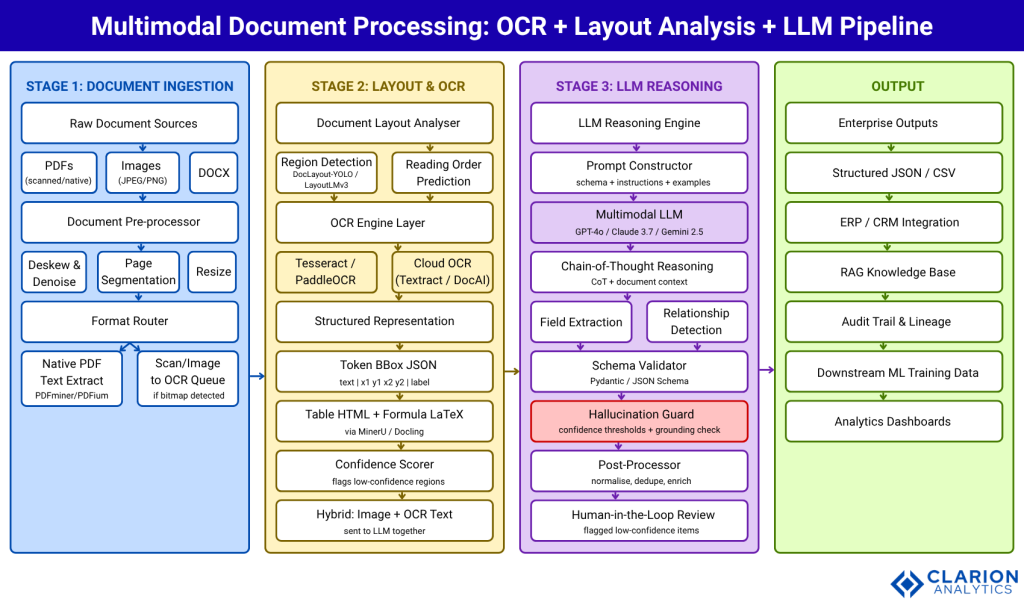
Figure 1: Clarion.ai end-to-end multimodal document processing architecture. Stage 1 handles ingestion and format routing. Stage 2 applies layout detection and OCR to produce typed, georeferenced elements. Stage 3 feeds the typed element map and source image to a multimodal LLM for extraction, schema validation, and hallucination checking. Validated data flows to downstream enterprise systems, RAG knowledge bases, and analytics dashboards.
Layout analysis gives the LLM a map. Without it, even the most capable model navigates a document completely blind.
Real-World Use Cases Across Industries
The following sectors have documented production deployments. In every case the core requirement is identical: extract specific fields from documents that vary in layout, quality, and format.
Financial Services. Loan origination, KYC onboarding, and claims processing generate thousands of documents daily. Precedence Research (2025) identifies BFSI as the largest IDP segment, holding approximately 40% of market share in 2024. Banks use OCR+LLM pipelines to extract borrower income, asset tables, and signature blocks from mortgage packages that mix standard forms with appended statements in wildly different layouts.
Legal and Contracts. Contract review platforms extract parties, obligations, payment terms, and penalty clauses from multi-hundred-page agreements. The layout analysis layer is critical here: nested clauses and cross-references have hierarchical structure that raw OCR collapses. An LLM with the layout map traces a defined term back to its definition across dozens of pages.
Healthcare. Clinical notes, lab reports, and prior authorisation forms combine structured fields with free-text clinical narratives. HIPAA-compliant deployments use on-premise vision models to keep patient data off external APIs entirely.
Logistics and Trade. Bills of lading, customs declarations, and certificates of origin combine tabular data with stamps and handwritten annotations. Hybrid pipelines route typed regions to text extractors and handwritten regions to dedicated OCR models before the LLM synthesises the full record.
Every industry drowning in documents has the same need: context-aware extraction that holds up when layout changes without warning.
Tools and Technology Choices
The market for multimodal document processing tools has consolidated around a small set of well-maintained open-source libraries and cloud APIs. The choice depends on throughput, data residency, and document complexity.
| Approach / Tool | Key Strength | Best Used When | Watch Out For |
|---|---|---|---|
| Docling (IBM / LF AI & Data Foundation, MIT Licence) | Advanced PDF layout, table structure; runs locally; native LangChain/LlamaIndex integration; 64,000+ GitHub stars (August 2026) | Sensitive data requiring local execution; RAG pipeline prep | Formula recognition still maturing; GPU recommended for throughput |
| MinerU (OpenDataLab, Apache 2.0) | SOTA accuracy on OmniDocBench; VLM+OCR dual engine; 109-language support; approximately 70,000 GitHub stars (August 2026) | Scientific documents with formulas and complex tables; high-volume batch | Higher GPU memory footprint; verify commercial licence terms |
| Unstructured (Unstructured-IO) | 20+ format support; cloud platform for enterprise scale; chunking + embedding built-in | Mixed-format document corpus; managed infrastructure; LLM ETL pipelines | Cloud tier is commercial; open-source OCR accuracy lower than premium |
| Cloud APIs (AWS Textract, Google Document AI, Azure Document Intelligence) | Managed scale; pre-trained models for forms and invoices; no infrastructure | Standard form types at high volume; teams without ML ops capacity | Data leaves your environment; per-page pricing at scale |
| Pure Multimodal LLM (GPT-4o, Claude 3.7, Gemini 2.5) | No OCR pipeline; handles variable layouts; simplest deployment path | Documents under 30 pages; variable layouts; zero-infrastructure teams | Latency, cost per page; hallucination risk on deterministic fields |
Code Snippet 1 — Docling: PDF to Structured Markdown
Source: docling-project/docling
A 5-line snippet that drives Docling’s full pipeline: layout detection, OCR, reading-order prediction, and table extraction all run inside convert(). The result is structured Markdown ready for LLM chunking or RAG ingestion.
from docling.document_converter import DocumentConverter

converter = DocumentConverter()
result = converter.convert('invoice_001.pdf')
markdown_output = result.document.export_to_markdown()
# Also: result.document.export_to_dict()  -> JSON with bounding boxes
Code Snippet 2 — Unstructured: Layout-Aware PDF Partition
Source: Unstructured-IO/unstructured
The hi_res strategy triggers layout detection before OCR, returning typed elements (Title, Table, NarrativeText) with bounding-box coordinates, the precise structure the LLM reasoning layer requires.
from unstructured.partition.pdf import partition_pdf

elements = partition_pdf(
    filename='annual_report.pdf',
    strategy='hi_res',
    infer_table_structure=True,
    include_page_breaks=True,
)
for el in elements:
    print(f'{el.category}: {str(el)[:120]}')
A pipeline that fails silently at 3% of documents will process hundreds of thousands of records before anyone notices the systematic error.
Implementation Guidance and Common Failure Modes
Teams building this pipeline encounter the same failure modes. Knowing them in advance saves weeks of debugging.
Benchmark document diversity first. Collect 50 representative documents from your corpus and run them through the candidate pipeline end-to-end. Measure field-level extraction accuracy, not character-level OCR accuracy. A tool hitting 99% character accuracy may still extract the wrong table cell because it misread reading order.
Design the schema before writing code. The target JSON schema drives everything: the prompt template, the Pydantic validator, the downstream database model, and the review interface. Teams that retrofit the schema after building the pipeline spend three times as long refactoring.
Use confidence thresholds and human-in-the-loop routing. Every LLM-extracted field should carry a confidence score from the model’s output logprobs or a secondary verification prompt. Fields below your threshold route to a review queue rather than passing downstream silently. McKinsey’s State of AI research (2025) consistently finds that organisations combining human oversight with AI automation report the most reliable production outcomes.
Monitor each stage independently. Error propagation is cumulative. A 97% accurate layout detector feeding a 98% accurate OCR engine feeding a 96% accurate LLM extractor produces field-level accuracy well below any individual component. Stage-specific metrics catch degradation before it reaches production.
Implement span attribution for critical fields. For high-stakes values (amounts, dates, party names), the extracted value should map back to a specific text span in the source document. If it cannot, flag the extraction for review rather than passing it through.
Frequently Asked Questions
How does document layout analysis work with large language models?
Layout analysis models detect and classify regions in a document image, attaching bounding-box coordinates to each region. The LLM receives this typed, georeferenced map plus the extracted text, allowing it to reason about spatial relationships. Without this map, even a powerful LLM processes documents as flat text, losing critical structural signals that determine which value belongs to which column header or clause hierarchy.
What is the best approach for enterprise information extraction from PDFs?
A hybrid architecture wins in most enterprise settings. Standard, high-volume fixed-format documents suit purpose-built OCR models with fixed field mappings, which offer high determinism and low cost per page. Variable-layout or complex documents suit a multimodal LLM with layout analysis as the pre-processing step. Route by document type and confidence level, not by a single blanket approach across your entire document corpus.
Is OCR or a multimodal LLM better for document extraction?
Neither dominates across all scenarios. Traditional OCR achieves near-perfect accuracy on fixed, clean forms because the layout never changes. Multimodal LLMs outperform on variable-layout, low-quality, or contextually complex documents. Research by Nunes et al. (XLLM 2025 workshop, co-located with ACL 2025) confirmed that MLLMs outperform table-transformer+OCR pipelines on table extraction when structured output and chain-of-thought prompting are applied. The optimal choice depends on document type, volume, and data residency requirements.
How do I handle hallucinations in LLM-based document extraction?
Implement three controls. Schema validation (Pydantic or JSON Schema) rejects malformed output immediately. Span attribution requires the extracted value to map back to a specific text span in the source document. Confidence-based routing sends uncertain extractions to a human review queue rather than passing them downstream silently. For critical numeric or date fields, a secondary verification prompt asking the LLM to locate and confirm the source span substantially reduces confabulation.
What document types benefit most from multimodal processing?
Documents with variable layouts, mixed content types, or low scan quality benefit most: contracts, annual reports, clinical notes, bills of lading, and research papers. Standard, high-volume forms such as tax filings, ID documents, and standardised invoices are better handled by purpose-built OCR models with fixed field mappings, which offer higher determinism and lower cost per page.
How does Clarion.ai approach multimodal document processing for enterprise clients?
Clarion.ai builds modular document intelligence pipelines that combine layout-aware OCR, document segmentation, and LLM-driven extraction into a single managed workflow. Clarion Analytics designs each pipeline around the client’s document corpus, data residency requirements, and downstream system integrations, rather than applying a generic off-the-shelf approach to varied document sets.
Can Clarion Analytics help with domain-specific document extraction, such as insurance claims or financial statements?
Yes. Clarion Analytics has experience building domain-specific extraction pipelines for BFSI, healthcare, and logistics clients. Domain-specific work typically involves custom schema design, fine-tuned layout models for sector-specific form types, confidence thresholds calibrated to regulatory accuracy requirements, and human-in-the-loop queues aligned with existing review workflows.
Does Clarion.ai offer support for both cloud and on-premise document processing deployments?
Clarion.ai supports both deployment models. Cloud deployments leverage managed APIs for scale and simplicity. On-premise and air-gapped deployments use locally hosted vision-language models for organisations with strict data residency or compliance requirements. The pipeline architecture is the same in both cases: the deployment target changes, not the underlying design. Contact the team through the Clarion.ai contact page to discuss your environment.
How Clarion.ai Can Help
Clarion.ai and Clarion Analytics build enterprise document intelligence pipelines that combine intelligent ingestion, layout-aware OCR, and LLM-driven structured extraction into a single managed workflow. Whether your organisation processes insurance claims, financial filings, legal contracts, or logistics documentation, every pipeline is tailored to your document corpus, schema requirements, and data residency constraints, with confidence scoring, human-in-the-loop routing, and stage-level monitoring built in from day one.
To discuss your requirements, contact Clarion.ai here.
InterPixels AI applies this same architecture to health insurance claims processing for TPAs across Asia. VoiceVertex AI extends it to voice and multi-channel data, so organisations handling both documents and call transcripts can unify extraction under the same schema-first design.
Conclusion
Three insights should guide your next architecture decision. First, multimodal document processing is a layered system: ingestion routing, layout analysis with OCR, and LLM reasoning must each be designed and monitored as separate components. Second, the optimal approach between pure OCR, pure LLM, and hybrid depends on document type: route by complexity and confidence, not by convention. Third, schema-first design and confidence-threshold routing are not refinements to add later; they separate working prototypes from production-grade systems.
The IDP market is growing at 33.8% CAGR and is projected to reach $29.7 billion by 2033 (Grand View Research, 2025). The organisations building reliable, modular pipelines now will compound that advantage as document volumes and model accuracy both continue to rise. What is the highest-value manual document review process in your organisation that a well-designed pipeline could route only the genuinely ambiguous cases back to a human reviewer for?
About the Author: Shivi

Related Posts