LLM-driven UI/UX in software engineering refers to the use of large language models to generate, evaluate, and iterate on user interface components and user experience patterns through natural language prompts. Rather than replacing designers and engineers, LLMs act as intelligent collaborators — accelerating prototyping, automating UX copy, and enabling design-to-code pipelines that previously required full design and frontend handoffs.
The Interface Is Moving Up the Stack
LLMs are changing UI and UX in software engineering faster than most teams have had time to plan for. According to Gartner (July 2025), by 2028, 90% of enterprise software engineers will use AI code assistants, up from less than 14% in early 2024. That is not a gradual adoption curve. That is a step change.
The primary interface for building software is shifting. Developers no longer start every UI with a blank component file. They describe what an interface should do and let a language model generate the first draft. The role of the engineer becomes review, refinement, and integration, not raw construction.
“By 2028, 90% of enterprise software engineers will use AI code assistants; the question is no longer whether to adopt, but how fast your team can adapt.”
This shift touches every layer of the product development process: how requirements are captured, how prototypes are made, how UX copy gets written, and how interfaces get tested. Each of these steps is measurably faster with LLMs involved.
From Handoffs to Prompts – How the Design Workflow Has Changed
Traditional UI development followed a predictable sequence: product spec, design mockup, stakeholder review, developer handoff, frontend implementation, QA. Each transition introduced delay, information loss, and rework. LLMs compress this chain significantly.
A 2024 TechCrunch analysis cited by UX practitioner Andy Bhattacharyya found that LLM-assisted prototyping cuts iteration time by approximately 50%, enabling more design cycles within the same timeline. The designer no longer hands off a Figma file and waits. They prompt a model, review the output, and refine in real time.
A 2024 Forrester analysis also found that translating technical information into user-friendly language is a pain point in 68% of cross-functional teams. LLMs address this directly. Given a raw API error like “JWT authentication failed due to token expiration,” a model returns: “Your session has expired. Please sign in again to continue.”
“The design-to-code handoff that once consumed days of iteration now collapses to a single, well-structured API call.”
Teams using LLMs to augment, not replace human judgment see 35% higher project success rates, according to Forrester (2024). That is consistent with McKinsey’s (2025) finding that top AI-performing software organizations achieved 16–30% improvements in team productivity and time to market, and 31–45% improvements in software quality.
LLM-Generated UI in Production – Real Use Cases
The use cases are no longer experimental. They run in production, across organizations of all sizes.
Screenshot-to-Code Pipelines
Tools like abi/screenshot-to-code (72,000+ GitHub stars as of 2026) accept a UI screenshot or Figma design and return clean HTML, Tailwind CSS, or React code via a vision-capable LLM. Vercel’s v0.dev applies the same principle inside a hosted product, and Bolt.new extends it to full-stack scaffolding.
AI-Assisted UX Copy and Error Messages
AI-assisted UX copy is the highest-ROI, lowest-risk entry point for most teams. The LLM receives brand guidelines, tone-of-voice documentation, and a rough technical description, then produces polished microcopy. Engineering and design no longer need a meeting to agree on what “something went wrong” should say.
Automated UX Evaluation
Research published in Electronics (November 2024) showed that LLMs, when provided with structured interaction logs and Nielsen’s heuristics as evaluation criteria, can conduct preliminary usability assessments at a fraction of the cost of manual expert review.
Conversational and Adaptive Interfaces
Instead of navigating nested menus, users state their intent in plain language. The UI renders appropriate controls dynamically. As Ahmed et al. (arXiv, 2025) confirm in their systematic review of 38 peer-reviewed studies, LLMs now integrate across the full design lifecycle — from ideation through evaluation.
The Architecture Behind LLM-Powered Interfaces
Understanding the technology pattern matters before you decide where to adopt it.
“LLMs don’t replace your frontend stack; they become a new layer in it, sitting between the product requirement and the rendered component.”
A modern LLM-powered UI system consists of four layers. The frontend component layer (React, Vue, Svelte) handles rendering and user input capture. The streaming API layer, most commonly the Vercel AI SDK, manages type-safe communication between the client and the LLM backend, handling streaming, error states, and tool call responses. The orchestration layer assembles prompts, manages conversation history, executes tool calls, and may invoke RAG to inject relevant context. The model provider (Anthropic, OpenAI, Google) runs inference and streams a structured response back through the same pipeline.
The Accenture & DFKI (2025) report highlights that Anthropic’s Model Context Protocol (MCP), released in 2024, is emerging as a standard for connecting the orchestration layer with external data sources — replacing fragmented custom integrations with a single, open protocol.
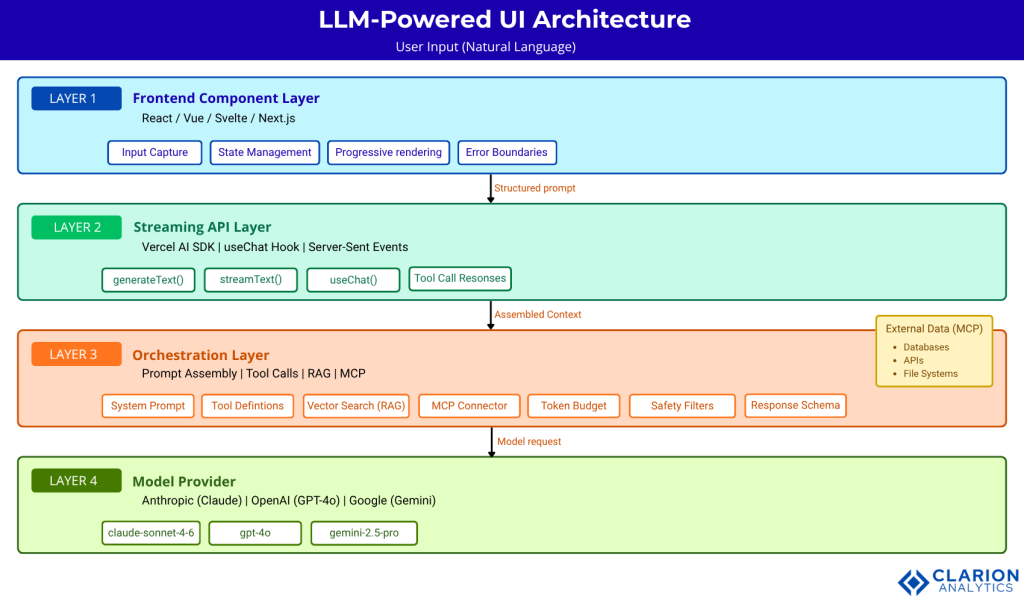
Figure: Four-layer architecture of a modern LLM-powered UI system. User natural-language input flows through the Frontend Component Layer into the Vercel AI SDK Streaming Layer. The Orchestration Layer assembles prompts, calls tools, and queries external data via MCP. The Model Provider runs inference and streams a typed response back up. The frontend renders output progressively, keeping the UI responsive while inference completes.
Choosing Your Stack – Tools and Frameworks Compared
| Approach / Tool | Key Strength | Best Used When |
|---|---|---|
| Vercel AI SDK | End-to-end TypeScript type safety; React/Next.js native; streaming and tool-call handling | Building production web apps on JS/TS stack with long-term maintainability requirements |
| screenshot-to-code | Zero-code design-to-HTML pipeline; Claude and GPT-4V support; video recording input | Rapid prototyping from Figma designs or existing UI screenshots with minimal setup |
| Streamlit / Gradio | Instant Python UI, no frontend experience required; LLM wiring in under 20 lines | Internal tools, ML demos, fast data-app prototypes for Python-first engineering teams |
| Direct API (Anthropic / OpenAI) | Maximum control over prompt structure, output schema, and orchestration logic | Teams with custom stacks or compliance requirements needing fine-grained control |
Gartner (October 2024) notes that by 2027, prompt engineering and retrieval-augmented generation will be essential skills for software engineers, meaning whichever tool you choose, your team needs these capabilities regardless.
Implementation Guidance – What Teams Building This Actually Face
In practice, teams building LLM-powered UI discover three gaps that no documentation warns them about. First, prompt brittleness: a prompt that generates a great login form on Monday produces broken markup on Friday after a model update. Second, latency expectations: streaming helps, but users notice when the first token takes two seconds. Third, review overhead: AI-generated code merges fast, but unreviewed components introduce accessibility regressions that surface in QA three sprints later.
Here is the pattern that production teams use successfully.
Snippet 1: Vercel AI SDK – generateText()
Source: vercel/ai – generate-text.ts
This snippet shows how the Vercel AI SDK abstracts every model provider behind a single generateText() call. Change the model string and nothing else in your application changes. This provider-agnostic pattern is how teams avoid lock-in while still moving fast.
“Treat every LLM-generated component like a junior developer’s first PR: review it, test it, but don’t block it from shipping.”
Snippet 2: screenshot-to-code — Design-to-HTML API Route
Source: abi/screenshot-to-code – backend/routes/generate_code.py
The entire design-to-code conversion, historically a multi-day handoff, runs in this FastAPI route. The assemble_prompt() function encodes the screenshot as base64, attaches a system prompt describing the target stack (HTML, Tailwind, React, or Vue), and sends both to the model. The returned code is production-ready enough to serve as the base of a component PR, not just a wireframe sketch.
McKinsey (2025) is direct on this: 78% of organizations now use AI in at least one business function, but only 6% qualify as high performers generating measurable EBIT impact. The difference between those groups is process discipline, not tool selection.
Frequently Asked Questions
How are LLMs actually used in UI/UX design? LLMs assist across the full design lifecycle, generating component code from descriptions or screenshots, writing UX copy and error messages, automating usability evaluations against heuristics like Nielsen’s, and producing design variants for A/B testing. The most mature use cases today are code generation and UX copy refinement, both of which are in active production use across thousands of teams.
Will AI replace UI/UX designers? No. Gartner (2025) and multiple studies confirm that LLMs act as force multipliers, not replacements. Teams using LLMs to augment human decision-making see up to 35% higher project success rates than those attempting full automation. The designer’s role shifts toward curation, orchestration, and ethical oversight rather than pixel-level execution.
What is the best tool for generating UI code with an LLM? It depends on your stack. Vercel AI SDK suits production TypeScript and React applications. The screenshot-to-code repository offers the fastest path from a Figma mockup to working HTML. Streamlit and Gradio serve Python-first teams building internal tools or ML prototypes. All three are actively maintained and have strong community adoption measured in tens of thousands of GitHub stars.
How do I prevent LLM hallucinations from breaking my UI? Use a strict output schema, JSON mode or structured outputs to constrain model responses. Enforce a human review gate before merging AI-generated components, and test generated code against your design system’s tokens and accessibility standards. Treating LLM output like a junior developer’s first PR reviewed, not blindly accepted, is the operational model that consistently delivers quality.
How do LLMs handle UX testing and accessibility evaluation? Research published in Electronics (November 2024) shows that LLMs can evaluate interfaces against Nielsen’s usability heuristics at significantly lower cost than manual expert review. By providing interaction logs and screenshots as context, teams can automate preliminary accessibility and usability audits, then escalate edge cases to human reviewers for final validation.
Three Things That Will Not Change Back
Three insights from everything above deserve to be kept close.
First, the design-to-code handoff is permanently shorter. Whether your team has adopted screenshot-to-code tools yet or not, your competitors have, and the gap compounds each sprint.
Second, natural language is now a first-class development interface. Writing clear prompts is a software engineering skill, and Gartner (2024) projects that 80% of engineers will need to upskill by 2027 to work with these tools.
Third, human judgment remains the irreplaceable quality gate. The teams generating real EBIT impact from AI McKinsey’s top 6% are the ones who combine fast LLM iteration with disciplined review processes, not the ones who remove humans from the loop.
If your team’s next sprint review still looks identical to one from 2022, what’s the cost of that gap?
About the Author: Imran Akthar

Related Posts