What is OpenCV? OpenCV (Open Source Computer Vision Library) is a BSD-licensed, cross-platform library of more than 2,500 algorithms for real-time image and video processing. Originally developed by Intel in 1999 and now maintained by the OpenCV Foundation, it supports C++, Python, and Java, runs on CPU and GPU, and forms the processing core of systems ranging from factory inspection cameras to autonomous vehicle perception stacks.
Why Computer Vision Skills Are Now a Strategic Priority
According to Grand View Research (2025), the global computer vision market was valued at USD 19.82 billion in 2024 and is projected to reach USD 58.29 billion by 2030, growing at a 19.8% CAGR. That growth sits inside an even broader shift: McKinsey (2025) reports that 78% of organisations now use AI in at least one business function, up from 55% in 2023. OpenCV computer vision Python skills sit at the intersection of both trends.
For software developers, that context translates to one practical reality: the gap between a team that ships vision features and one that cannot is mostly a gap in library knowledge, not hardware or budget. OpenCV closes that gap faster than any alternative, because it handles everything from raw pixel manipulation to running a pre-trained YOLO model in fewer than 50 lines of Python.
For CTOs, the business case is equally direct. Accenture (2024) found that companies with fully AI-led processes achieve 2.5x higher revenue growth and 3.3x greater success scaling AI use cases compared to peers. Vision AI, powered by OpenCV, is one of the fastest routes from experiment to production revenue.
“The gap between teams that ship vision features and those that cannot is mostly a gap in library knowledge, not hardware or budget.”
What OpenCV Actually Does: Core Architecture in Plain English
OpenCV processes each frame through a linear pipeline: image capture, colour space conversion, algorithmic transformation, and output, with optional deep neural network inference inserted at the transform stage. Every step is a discrete function call, which makes it straightforward to add, remove, or swap components without touching the rest of the system.
The library is structured into modules. The core module handles matrix operations (every image is a NumPy array in Python). The imgproc module covers filtering, morphology, and geometric transforms. The highgui module handles display and keyboard events. The dnn module loads and runs pre-trained models from TensorFlow, Caffe, ONNX, and Darknet. The contrib repository adds specialised modules: SIFT feature matching, ArUco marker detection, and hardware-accelerated trackers.
Understanding this modular layout resolves one of the most common developer frustrations: the assumption that OpenCV is a monolith. It is not. You load only what you need, which keeps production containers lean and startup time short.
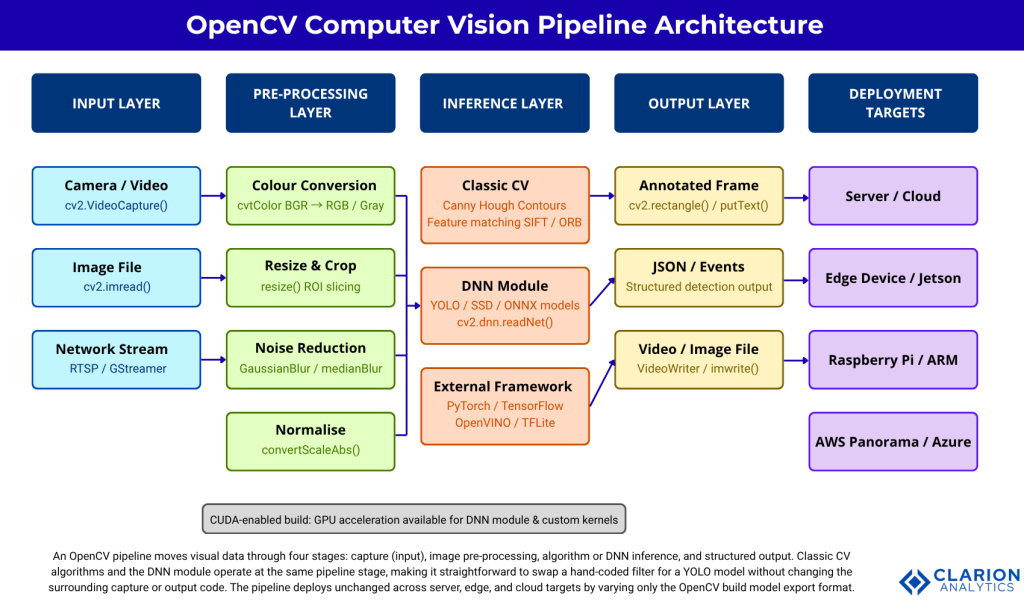
Figure 1: OpenCV Computer Vision Pipeline Architecture. An OpenCV pipeline moves visual data through four stages: input capture, image pre-processing, algorithm or DNN inference, and structured output. Classic CV algorithms and the DNN module operate at the same pipeline stage, making it straightforward to swap a hand-coded filter for a YOLO model without changing the surrounding capture or output code. The pipeline deploys unchanged across server, edge, and cloud targets by varying only the OpenCV build and model export format.
Five Real-World Use Cases Where OpenCV Runs in Production
OpenCV powers use cases across manufacturing, healthcare, automotive, retail, and security. According to Global Market Insights (2025), the computer vision market is expected to reach USD 111.3 billion by 2034, with manufacturing and automotive leading adoption. The five use cases below account for most of that growth.
1. Automated quality inspection. Manufacturers use OpenCV’s contour detection and morphological transforms to identify surface defects at camera-line speeds above 200 frames per second. A typical pipeline: Gaussian blur to suppress sensor noise, adaptive thresholding to isolate the defect region, and contour area filtering to classify severity.
2. Facial recognition access control. OpenCV’s DNN module loads a face-detection model (RetinaFace or MTCNN) and a recognition embedding network. The pipeline runs entirely on CPU for low-throughput doors and switches to CUDA-accelerated inference for high-traffic entrances.
3. Autonomous vehicle perception. Lane detection, pedestrian segmentation, and traffic-sign classification all start with OpenCV pre-processing before frames reach the main deep learning inference engine. Mordor Intelligence (2026) notes that automotive is the fastest-growing segment at an 18.23% CAGR, driven by ADAS camera shipments expected to hit 240 million units in 2026.
4. Medical image analysis. Radiology teams pre-process DICOM images with OpenCV before feeding them into classification networks: normalise pixel intensities, crop region of interest, apply CLAHE (Contrast Limited Adaptive Histogram Equalisation) to enhance tissue boundaries. The Springer review (2025) on visual object detection frameworks confirms that deployment-readiness, not raw accuracy, is now the primary constraint in clinical environments.
5. Real-time augmented reality. ArUco marker detection from opencv_contrib enables sub-millisecond pose estimation. A warehouse management system can overlay picking instructions on a live camera feed without a dedicated AR headset.
“Manufacturing defect detection, autonomous vehicle perception, and medical imaging share one common foundation: an OpenCV pre-processing stage that the deep learning model depends on absolutely.”
OpenCV vs TensorFlow vs PyTorch: Choosing the Right Tool
OpenCV handles image I/O, pre-processing, and lightweight inference. PyTorch and TensorFlow handle model training and complex inference. Production systems typically use all three together, not one in place of another. The table below maps each option to its strengths and the decision point that triggers its use.
| Option | Key Strength | Best Used When |
|---|---|---|
| OpenCV (standalone) | Fast I/O, pre-processing and classic algorithms; zero ML framework dependencies | Lightweight edge tasks: barcode scanning, OCR pre-processing, motion detection |
| OpenCV + DNN module | Runs YOLO/SSD/ONNX models natively; no PyTorch or TensorFlow in production | Inference on fixed models where training is done externally; server or edge |
| OpenCV + PyTorch | Full training and fine-tuning; rich ecosystem of pretrained models | Active research, custom model training, or teams already on PyTorch |
| OpenCV + TFLite / OpenVINO | Quantised model inference optimised for ARM and Intel hardware | Raspberry Pi, Jetson Nano, or Intel NUC edge deployments with tight compute budgets |
| Managed Cloud Vision API | Zero MLOps overhead; pay-per-call; handles retraining | Low-volume, high-value lookups where latency above 200 ms is acceptable |
In practice, the most common architecture for mid-size teams is: OpenCV for capture and pre-processing, PyTorch for model development, and OpenCV’s DNN module or ONNX Runtime for production inference. This separates the training environment from the deployment environment, which simplifies Docker images and reduces dependency conflicts.
How to Build a Computer Vision Pipeline with OpenCV
A minimal OpenCV pipeline requires four steps: import cv2, call VideoCapture, process each frame inside a while loop, and break on keypress. All production complexity builds on this skeleton. The two snippets below show the skeleton and then extend it with deep learning inference.
Code Snippet 1: Real-Time Edge Detection Source: opencv/opencv / samples/python/edge.py
This 11-line script demonstrates the complete capture-convert-process-display loop. The two Canny threshold parameters (50, 150) are the most common tuning point in production: a lower first threshold accepts weaker edges; a higher second threshold demands stronger gradient continuity. Teams typically expose these as environment variables for operator adjustment without a code deploy.
Code Snippet 2: Running a Pre-Trained DNN Model Source: opencv/opencv / samples/dnn/object_detection.py
This snippet shows OpenCV running YOLO inference natively. The setPreferableBackend and setPreferableTarget calls switch between CPU, CUDA, and OpenCL with a single line change. Teams building this typically find that switching from DNN_TARGET_CPU to DNN_TARGET_CUDA reduces inference latency by 5x to 10x on a mid-range GPU, without touching any other code.
“Switching from CPU to GPU inference in OpenCV requires changing exactly two lines. The rest of your pipeline stays identical.”
Scaling OpenCV: GPU, Edge, and Cloud Deployment Options
OpenCV scales from laptop to production through three paths. According to Mordor Intelligence (2026), edge-based deployment held 47.33% of the computer vision market in 2025 and is the fastest-growing deployment mode, driven by data sovereignty laws and latency requirements that cloud transfer cannot meet.
GPU acceleration. Build OpenCV with CUDA enabled (or install the opencv-contrib-python wheel for CUDA) and set DNN_TARGET_CUDA. The opencv/opencv repository with 86,793 stars and active commits through March 2026 includes CUDA kernels for common transforms. Custom kernels use cv::cuda::GpuMat, which mirrors the Mat API and requires minimal code changes.
Edge deployment. Export your PyTorch model to ONNX, then load it with cv2.dnn.readNetFromONNX. OpenVINO-optimised models run on Intel Neural Compute Sticks and Jetson devices. The opencv/opencv_contrib repository (8,300+ stars, updated April 2025) includes the CUDA-accelerated tracker and ArUco modules that power most edge AR applications.
Cloud middleware. AWS Panorama and Azure IoT Edge both support OpenCV containers. The pipeline code is identical to a local deployment. Teams building this find that containerising OpenCV with a minimal Alpine base keeps image size below 500 MB, which matters for over-the-air updates on constrained bandwidth connections.
Frequently Asked Questions About OpenCV
Is OpenCV free to use in commercial applications?
Yes. OpenCV is released under the BSD licence, which permits commercial use, modification, and redistribution without requiring you to open-source your application code. The contrib modules share the same licence for most modules, but check individual module headers for any non-free algorithms. SIFT is now fully free after its patent expired in 2020.
Can OpenCV run deep learning models without TensorFlow or PyTorch installed?
Yes. OpenCV’s built-in DNN module loads model files directly from disk using cv2.dnn.readNet, cv2.dnn.readNetFromONNX, or framework-specific loaders. At inference time, the only dependency is OpenCV itself. TensorFlow and PyTorch are needed only if you train or fine-tune the model. This is the key reason to prefer the DNN module over a full framework in production containers.
What is the difference between opencv-python and opencv-contrib-python?
opencv-python contains the main OpenCV modules only. opencv-contrib-python adds the extra modules: SIFT, ArUco, the CUDA-accelerated tracker, and others. Install only one. Running both in the same environment causes the cv2 import to break with a duplicate library error. Use opencv-contrib-python for production deployments that need feature matching or ArUco.
How fast is OpenCV for real-time video processing?
On a modern CPU, OpenCV processes 1080p frames at 60 to 120 fps for simple transforms like resizing and colour conversion. Canny edge detection runs at roughly 30 fps on a single core. DNN inference speed depends entirely on model size and hardware: a MobileNet-SSD runs at 40 fps on CPU and 200+ fps with CUDA. Profile with cv2.getTickCount to measure per-stage latency in your specific pipeline.
When should I use OpenCV instead of a managed cloud vision API?
Use OpenCV when you need sub-100 ms latency, process high frame-rate video, handle sensitive data that cannot leave your network, or require customised detection logic that a general API cannot support. Use a managed API when volume is low (under 1,000 images per day), the use case is standard (label detection, OCR, facial emotion), and your team lacks ML operations capacity to maintain a custom model.
What Every Development Team Should Take Away
Three insights stand above everything else in this guide. First, OpenCV is not a beginner-only tool. With 86,793 GitHub stars and active commits through 2026, it runs in Tesla vehicles, hospital imaging suites, and Amazon warehouse robots. Second, the DNN module eliminates the need to deploy PyTorch or TensorFlow into production, which cuts container size, startup time, and attack surface in one move. Third, the same pipeline code runs unchanged from a developer laptop to an edge device to a cloud container, provided you manage your build and model format correctly.
The computer vision market will reach USD 58 billion by 2030. Teams that build OpenCV fluency now compound that investment across every project that follows.
What is the first vision feature your product should ship?
About the Author: Imran Akthar

Related Posts