What is LangChain? LangChain is an open-source Python and TypeScript framework for building applications powered by large language models (LLMs). It provides modular components like chains, retrievers, memory, agents, and tool integrations that developers assemble into coherent pipelines. Rather than wiring together raw API calls, teams use LangChain to define structured workflows: from document ingestion and vector storage to multi-step agent reasoning and production observability. It supports every major LLM provider and runs on any infrastructure.
Why Developers Are Flocking to LangChain Right Now
McKinsey’s November 2025 State of AI report found that 88% of enterprises now use AI in at least one business function, up from 78% just a year earlier. Yet fewer than 10% have scaled AI agents in any single function. The gap is not ambition. The gap is architecture. If you want to build a custom chatbot with LangChain, you are picking the tool that most teams reach for when they close that gap.
LangChain launched in late 2022 and has since accumulated over 96,000 GitHub stars and 28 million downloads per month. It has become the default orchestration layer for developer teams wiring LLMs into real applications, not because it is flashy, but because it solves the hardest integration problems cleanly.
This guide covers the full picture: what LangChain is, how its architecture works, five real-world use cases, a step-by-step implementation, and the production concerns most tutorials skip.
“88% of enterprises already use AI; the bottleneck is never the model, it is always the integration.”
What LangChain Actually Is (and What It Is Not)
LangChain is a framework for chaining LLM calls, retrieval steps, tool invocations, and memory into repeatable, testable pipelines. It is not an LLM itself; it is the glue between your data, your model, and your user.
The framework ships as two packages: langchain (core abstractions and chains) and langchain-community (third-party integrations). A companion package, langchain-openai, handles OpenAI-specific bindings. For production deployments with complex workflows, LangGraph extends the framework to support stateful, multi-actor agent graphs.
Model support is deliberately broad. LangChain integrates with OpenAI, Anthropic Claude, Google Gemini, AWS Bedrock, Azure OpenAI, Hugging Face, Mistral, Ollama (local models), and dozens more. You can swap providers without touching your chain logic, a critical design decision for teams managing costs or evaluating models.
Five Real-World Use Cases for LangChain Chatbots
The most common LangChain chatbot deployments include internal knowledge assistants, customer support bots, code review agents, HR Q&A systems, and document analysis tools, each built on the same RAG or agent pattern. The data changes; the architecture does not.
Here is how each use case maps to the framework:
- Internal knowledge assistant: Index Confluence, Notion, or SharePoint; let employees query policy docs and runbooks in natural language.
- Customer support bot: Retrieve from a product knowledge base; escalate unresolved queries to human agents via a LangGraph conditional edge.
- Code review agent: Use a ReAct agent with tool access to GitHub, Jira, and a vector store of your style guide; automate PR feedback.
- HR Q&A: Ingest benefits PDFs, employee handbooks, and org charts; answer questions without exposing raw documents.
- Document analysis: Process legal contracts, financial reports, or research papers; extract structured summaries with citations.
“The chatbot pattern that works for customer support at scale is identical to the one that works for internal HR Q&A, only the data changes.”
The Architecture: How a LangChain Chatbot Works
A LangChain chatbot runs two pipelines in sequence: an offline indexing stage that chunks, embeds, and stores documents, and an online retrieval-generation stage that fetches relevant context and feeds it to the LLM. These two pipelines are intentionally decoupled so you can update your knowledge base without redeploying your chat service.
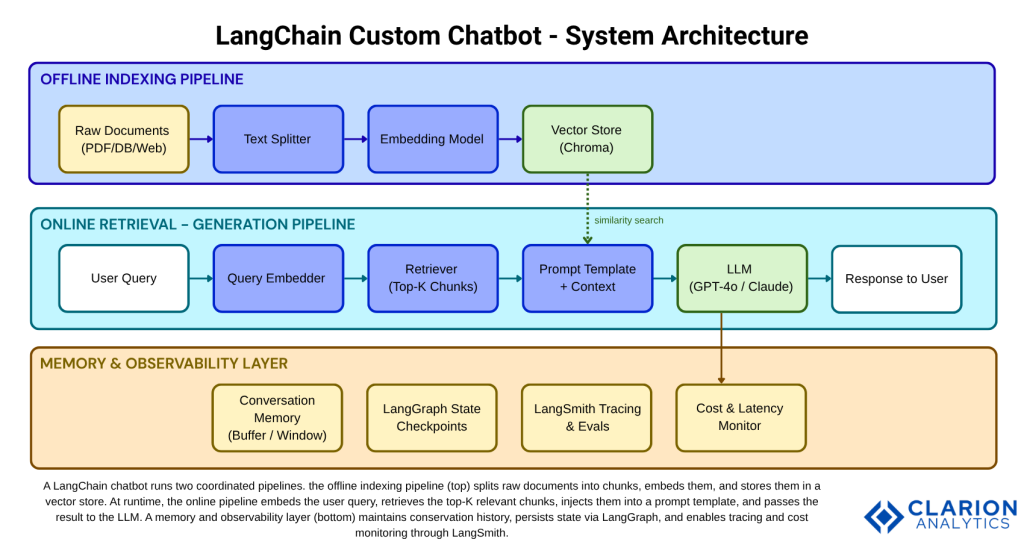
The offline pipeline runs once (or on a schedule). Raw documents like PDFs, databases, web pages pass through a text splitter that breaks them into overlapping chunks. Each chunk is converted into a dense vector by an embedding model and stored in a vector database such as Chroma (26k+ GitHub stars, 11M+ monthly downloads). At query time, the user’s message is embedded and compared against stored vectors using cosine similarity. The top-K most relevant chunks are injected into a prompt template alongside the question. The LLM generates a grounded answer.
This pattern, Retrieval-Augmented Generation (RAG), was validated in peer-reviewed research by Vidivelli, Ramachandran, and Dharunbalaji (2024) in Computers, Materials & Continua. Their study showed that combining LangChain, RAG, and efficient fine-tuning methods yields simultaneously improved accuracy, better user experience, and access to broader knowledge without retraining a model from scratch.
Core Components and Tools You Need
Every LangChain chatbot relies on four building blocks: an LLM provider, an embedding model, a vector store, and a chain or agent that coordinates them. The table below maps your options across the most common choices:
| Option | Key Strength | Best Used When | Weakness |
|---|---|---|---|
| LangChain + RAG | Modular pipeline; model-agnostic; rich ecosystem | Grounding LLM on proprietary documents or databases | Steeper learning curve than a single API call |
| Raw OpenAI API | Minimal dependencies; maximum control | Simple single-turn Q&A with no retrieval needed | No built-in memory, retrieval, or observability |
| LlamaIndex | Data-centric; excellent for complex document hierarchies | Indexing structured + unstructured docs at scale | Smaller agent ecosystem than LangChain |
| Haystack | Production-hardened; strong NLP pipeline design | Enterprise NLP search systems with strict SLA requirements | Smaller community; fewer LLM integrations |
“Choosing a vector store is a production decision disguised as a developer preference; get it right before you scale.”
For most teams starting out, the recommended stack is: OpenAI GPT-4o or Anthropic Claude for the LLM, text-embedding-3-small for embeddings (cost-efficient at 8 cents per million tokens), and Chroma for local development (Pinecone or pgvector for production). That combination covers 90% of enterprise chatbot use cases and requires no infrastructure beyond a Python environment and API keys.
The langchain-ai/langchain repository (96k+ GitHub stars, actively maintained with weekly releases) is your primary dependency. LangGraph handles stateful multi-step workflows and is essential once your chatbot needs to branch, loop, or call external tools conditionally.
Step-by-Step Implementation Guide
Building a LangChain chatbot takes five steps: install dependencies, configure your LLM and embeddings, index your documents, wire up a retrieval chain, and add memory. Teams building this typically find the indexing step is where most debugging happens; chunk size and overlap settings have an outsized effect on retrieval quality.
Step 1 – Install and Configure
Source: langchain-ai/langchain official docs (2025)
The following snippet initializes any LLM provider with a single function call. Swap providers by changing the model string, no other code changes needed:
This model-agnosticism is LangChain’s most operationally important feature. You can prototype with a cheap model and switch to a more capable one for production or run A/B evaluations without restructuring your chain.
Step 2 – Index Documents (RAG Pipeline)
Source: Real Python LangChain RAG Tutorial / Chroma LangChain Integration Docs (2024–2025)
This snippet covers the indexing half of the RAG pipeline. It splits documents, embeds the chunks, and persists them in Chroma. Run this offline or on a cron job, so it does not block query-time performance:
The chunk_size parameter is the most consequential tuning lever. Too large and retrieval returns generic context. Too small and answers lack coherence. Start at 500 tokens with 50-token overlap and adjust based on your document structure.
Step 3 – Wire the Retrieval Chain and Add Memory
Connect the retriever to your LLM using LangChain’s LCEL (LangChain Expression Language) syntax. Add ConversationBufferWindowMemory to retain the last N turns. For persistent cross-session memory, use LangGraph’s checkpoint system, which stores state to a database between conversations.
“Every LangChain prototype that fails in production fails for the same reason: memory, observability, and cost were afterthoughts.”
From Prototype to Production: What Changes
The biggest differences between a LangChain demo and a production chatbot are observability (LangSmith), persistent memory (LangGraph checkpoints), latency management (streaming), and cost monitoring per chain run. Demos skip all four. Production systems cannot.
In practice, teams building this find three recurring bottlenecks. First, vector store queries slow down as corpus size grows; solution: use Chroma Cloud or Pinecone with HNSW indexing and a metadata pre-filter. Second, LLM latency spikes under load; solution: enable token streaming so the UI renders progressively. Third, costs drift invisibly; solution: attach a LangSmith project from day one and track token counts per chain run as a KPI.
According to McKinsey (March 2025), redesigning workflows, not just adopting tools, is the single factor most correlated with measurable EBIT impact from AI. A chatbot wired directly into a helpdesk ticketing system and tracked against deflection rate delivers ROI. A chatbot that lives in a demo environment does not. Treat LangSmith observability and LangGraph state management as part of the initial build, not a follow-on sprint.
Gartner projects that by 2028, 33% of enterprise software applications will include agentic AI, up from less than 1% in 2024. Teams that master the LangChain stack now will be the ones shipping those agents.
Frequently Asked Questions About LangChain Chatbots
What is the difference between LangChain and the OpenAI API?
The OpenAI API is a raw interface to a single LLM; you send a prompt, you get a response. LangChain is a framework that orchestrates multiple LLM calls, retrieval steps, memory, and tool integrations into a repeatable pipeline. Use the OpenAI API alone for simple, single-turn completions. Use LangChain when your chatbot needs to reason over documents, remember context, or call external systems.
Do I need machine learning expertise to build a LangChain chatbot?
No. LangChain abstracts the complexity of LLMs behind Python classes. Intermediate Python skills, API familiarity, and basic understanding of how HTTP requests work are sufficient. You do not need to train models, understand gradient descent, or know transformer architecture to ship a production chatbot with LangChain.
How does LangChain prevent AI hallucinations?
LangChain does not eliminate hallucinations, but RAG dramatically reduces them. By injecting retrieved document chunks directly into the prompt, the LLM is constrained to generate answers based on provided context rather than parametric memory. Prompt templates can include explicit instructions such as “answer only from the context provided, say you do not know if the answer is not present.” This grounding approach was validated in peer-reviewed research (Vidivelli et al., 2024).
Can LangChain chatbots work with private or on-premise data?
Yes. LangChain supports fully local deployments. Run Ollama or llama.cpp for the LLM, use sentence-transformers for embeddings, and run Chroma locally as the vector store. No data leaves your infrastructure. This is the recommended path for regulated industries such as healthcare, finance, and legal, where data residency requirements prohibit sending documents to third-party APIs.
What is LangGraph and when should I use it instead of LangChain alone?
LangGraph is a graph-based orchestration layer built on top of LangChain. Use it when your chatbot needs to branch conditionally (for example, route to a specialist tool based on intent), retry failed steps, maintain state across multiple turns or sessions, or coordinate multiple sub-agents in parallel. For a basic single-purpose Q&A chatbot, LangChain alone is sufficient. For anything with complex decision logic, LangGraph is the right layer.
Three Things Worth Remembering
First: the architecture matters more than the model. A well-structured RAG pipeline with a mid-tier LLM consistently outperforms a raw GPT-4 call stuffed with unstructured context. Design the indexing pipeline carefully before choosing your LLM.
Second: production is a different problem from prototyping. Memory, observability, streaming, and cost monitoring are not optional extras. Build them in from the start using LangGraph and LangSmith, and tie your chatbot’s performance to a measurable business KPI, deflection rate, resolution time, or CSAT score.
Third: LangChain is not a dead end. Its modular design means you can start simple, a chain with a retriever and a prompt template, and evolve toward multi-agent architectures as your requirements grow. 88% of enterprises now use AI, but fewer than 10% have scaled agents in any function. The teams that close that gap first will define the standard for everyone else. The question worth sitting with: what is the one internal workflow in your organization that a well-built chatbot could transform in the next 90 days?
About the Author: Imran Akthar

Related Posts