What is Llama fine-tuning? Llama fine-tuning is the process of continuing the training of Meta’s open-source Llama language models on a custom, domain-specific dataset to adapt their outputs for a particular task or use case. Using parameter-efficient methods like LoRA and QLoRA, teams can fine-tune Llama models on a single consumer GPU in hours without ever modifying the original pre-trained weights directly.
Why Generic Llama Models Are Not Enough for Production
A base Llama model is a brilliant generalist. It cannot be your legal document summarizer, your brand-voice chatbot, or your internal code assistant, not reliably.
Gartner predicts (2025) that by 2027, more than half of enterprise GenAI models will be domain-specific, up from just 1% in 2024. The pressure to customize is not abstract; it is a competitive timeline. Yet most teams stall at one of three failure points: they assume fine-tuning requires $50,000 in GPU hardware, they do not know how to format training data correctly, or they have no clear path from a trained checkpoint to a production API.
This guide addresses all three. It covers how to fine-tune Llama using LoRA and QLoRA, how to prepare data that actually moves the needle, and how to merge and deploy your adapter without adding inference latency.
“By 2027, Gartner predicts more than half of enterprise AI models will be domain-specific, the question is whether your team will build that advantage or buy it.”
When to Fine-Tune vs. When to Prompt Engineer
Fine-tune when consistent tone, domain vocabulary, or structured output is required across thousands of inferences, not when a well-crafted system prompt gets you 80% of the way.
The decision is not fine-tuning versus prompting. It is about matching the tool to the reliability requirement. A customer service bot answering 50,000 queries per day cannot afford a 5% hallucination rate. A one-off summarization task can. Use the table below to decide.
| Approach | Key Strength | Best Used When |
|---|---|---|
| Prompt Engineering | Zero infrastructure cost, instant iteration | Task is well-defined; base model already knows the domain |
| RAG | Injects live, updatable knowledge | Data changes frequently; hallucination risk from stale training |
| LoRA Fine-Tuning | Adapts behavior and tone; low compute | Domain vocabulary, consistent style, or structured output needed |
| QLoRA Fine-Tuning | LoRA + 4-bit quant; fits consumer GPU | Tight hardware budget; 70B+ models; fastest adaptation path |
| Full Fine-Tuning | Full control over all weights | Large proprietary datasets; regulatory compliance; massive scale |
Real-world examples where fine-tuning clearly wins: legal contract clause extraction, medical coding from clinical notes, internal developer assistants trained on proprietary APIs, and sales chatbots that must maintain a specific brand tone.
Understanding LoRA and QLoRA – The Engine Behind Efficient Fine-Tuning
LoRA freezes the original model weights and injects pairs of small low-rank matrices into each transformer layer. Only those matrices train, reducing trainable parameters by 99%+ while retaining 95-98% of full fine-tuning performance.
The math is simple: instead of updating the original weight matrix W directly, LoRA approximates the update as the product of two smaller matrices B and A, so the effective weight becomes W + BA. The rank parameter r (typically 8 to 64) controls the compression factor. This approach reduces trainable parameters by over 99% while achieving 95-98% of full fine-tuning performance, according to Amir Teymoori’s 2025 LoRA guide.
QLoRA takes this one step further. As demonstrated in the original QLoRA paper (Dettmers et al., 2023), the approach reduces memory usage enough to fine-tune a 65B parameter model on a single 48GB GPU while preserving full 16-bit fine-tuning task performance, with the best resulting models reaching 99.3% of ChatGPT’s performance after just 24 hours of training on one GPU.
“Full fine-tuning a 7B Llama model demands 100-120 GB of VRAM. QLoRA achieves the same result on a $1,500 consumer GPU, the compute moat is gone.”
Code Snippet 1: QLoRA Setup with Hugging Face PEFT
Source: huggingface/peft + Meta Llama fine-tuning docs
This snippet does two things: it quantizes the base model to 4-bit NormalFloat (NF4) format using BitsAndBytesConfig, then injects LoRA adapter matrices into only the query and value projection layers. The resulting model trains under 10 GB of VRAM while the 8B parameter base model stays frozen.
Step-by-Step: Preparing Your Training Data
Format your dataset in instruction-response pairs (Alpaca or ShareGPT format), remove duplicates, balance class distributions, and cap examples at your target sequence length before writing a single line of training code.
A 2025 infrastructure guide by Introl confirms that quality training data matters more than quantity: filter for high-quality examples relevant to the target task, remove duplicates and near-duplicates, and validate data format consistency. The QLoRA paper demonstrated that fine-tuning on a small, high-quality dataset produces state-of-the-art results, even beating larger, noisier alternatives.
Target 500 to 5,000 examples for most domain-adaptation tasks. A dataset of 1,000 clean, representative samples will outperform 100,000 scraped and uncleaned ones. Use Hugging Face Datasets to load and preprocess, and set max_seq_length to 1024 or 2048. Enable packing=True to bin short samples together and maximize GPU utilization.
Step-by-Step: Running the Fine-Tuning Job
Set LoRA rank to 16, attach adapters to the attention projection layers, enable gradient checkpointing, and train for one epoch with a learning rate of 2e-4; this is the starting configuration that works for most tasks.
In practice, teams building this typically find that the LoRA rank is the most consequential hyperparameter after data quality. As the official Llama fine-tuning documentation explains, LoRA reduces the number of trainable parameters by adding low-rank matrices to the network and only training those, resulting in significant reductions in both compute and memory requirements. Start with r=16 and increase only if evaluation loss plateaus early.
The recommended training configuration, drawn from Hugging Face’s 2025 fine-tuning guide:
yaml
# Training configuration (YAML for SFTTrainer)
model_name_or_path: Meta-Llama/Meta-Llama-3.1-8B
use_peft: true
load_in_4bit: true          # QLoRA
lora_r: 16
lora_alpha: 16
lora_target_modules: "all-linear"
num_train_epochs: 1
per_device_train_batch_size: 8
gradient_accumulation_steps: 2
learning_rate: 2.0e-4
gradient_checkpointing: true
output_dir: ./llama-3-1-8b-finetuned
Use unslothai/unsloth if you want 2x faster training on the same hardware, it rewrites the attention and MLP layers as Triton kernels with zero accuracy loss.
“Teams building this typically find that data quality decisions made before training determine 80% of the final model’s quality, the framework choice is almost secondary.”
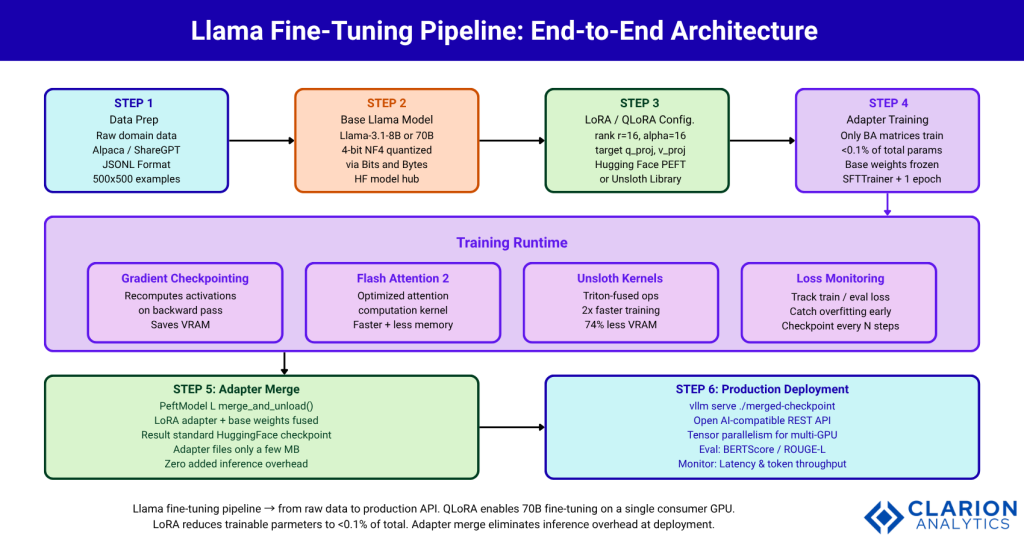
Figure: Full Llama fine-tuning pipeline from raw data to production API. LoRA reduces trainable parameters to <0.1% of total. QLoRA enables 70B model fine-tuning on a single consumer GPU. Adapter merge eliminates inference overhead at deployment.
Step-by-Step: Merging Adapters and Deploying to Production
Merge the LoRA adapter into the base model weights using merge_and_unload(), then serve the single merged checkpoint with vLLM, zero additional inference latency, fully compatible with standard serving infrastructure.
As demonstrated in the LLaMA PEFT survey (arXiv 2510.12178, 2025), PEFT adapters can be stored separately at only a few MB for small ranks and merged at inference time, with the added latency being minimal or zero after merging. This closes the deployment gap that most tutorials leave open.
Code Snippet 2: Merge LoRA Adapter and Serve with vLLM
Source: amirteymoori.com — LoRA fine-tuning guide 2025
The merge_and_unload() call fuses B and A matrices back into the original weight matrix. The result is a standard Hugging Face checkpoint with no adapter overhead at inference. vllm serve then exposes an OpenAI-compatible API endpoint, making it drop-in replaceable in any existing pipeline.
After deployment, evaluate on a held-out test set using BERTScore for semantic similarity, ROUGE-L for extraction tasks, or task-specific benchmarks. Monitor inference latency and token throughput. Re-quantize to 8-bit with bitsandbytes for production serving if latency is a constraint.
“Merging your LoRA adapter into the base model costs 10 minutes of compute and eliminates inference overhead permanently, it is the step most teams skip and then regret.”
Frequently Asked Questions About Llama Fine-Tuning
How much GPU memory do I need to fine-tune a Llama model?
With QLoRA, you can fine-tune Llama 3.1 8B on 8-10 GB of VRAM and Llama 3.1 70B on a single 24 GB GPU. Full fine-tuning of a 7B model requires 100-120 GB, making consumer hardware impractical. QLoRA (Dettmers et al., 2023) is the recommended starting point for most teams with limited infrastructure.
How many training examples do I need for Llama fine-tuning?
The QLoRA paper demonstrates that 500 to 5,000 high-quality, curated examples often outperform tens of thousands of noisy ones. Quality matters more than quantity. Focus on domain-representative, correctly formatted data before scaling dataset size. A well-curated 1,000-example dataset is a strong starting point for most tasks.
What is the difference between LoRA and QLoRA for Llama fine-tuning?
LoRA adds small low-rank adapter matrices to frozen model weights. QLoRA combines LoRA with 4-bit quantization of the base model, cutting VRAM requirements by roughly 75% compared to standard LoRA. Use QLoRA when GPU memory is limited or you are working with 30B+ parameter models.
Can I fine-tune Llama without a GPU?
Fine-tuning Llama on CPU alone is impractical for any model above 1B parameters; training would take days to weeks. Free cloud GPU options include Google Colab (T4), Kaggle (P100/T4), and Lambda Labs. QLoRA on a single free T4 is a viable starting point for Llama 3.1 8B.
How do I deploy a fine-tuned Llama model to production?
Merge your LoRA adapter into the base model using merge_and_unload(), then save the checkpoint. Serve it with vLLM or Ollama for production-grade inference. For multi-GPU setups, vLLM’s tensor parallelism (--tensor-parallel-size) handles horizontal scale without additional code changes.
Conclusion
Three things define a successful Llama fine-tuning project. First, the compute barrier has collapsed. QLoRA makes 70B model fine-tuning accessible on hardware any mid-sized engineering team can buy today. Second, data quality is the actual differentiator; 1,000 clean, representative training examples beat 100,000 scraped ones reliably. Third, adapter merging closes the deployment gap; merge your LoRA weights, serve with vLLM, and your fine-tuned model carries zero inference overhead.
The open question is not whether your team can afford to fine-tune Llama. The question is: what proprietary capability are you leaving on the table by not doing it?
About the Author: Imran Akthar

Related Posts